How it scored
For free, you type each date or sync a school or team calendar link if one exists. Calendar Plus reads a photo, a voice note or a forwarded email. Skylight shows a photo or voice import for you to check before adding it, but doesn't say what it does with a page of many dates.
A Profile and color per person, set up by you in the app, and anyone you invite by link can view and manage the calendar, with no charge listed for adding people. Docked because everyone invited, and anyone with the Skylight's email address, can manage everything.
One screen the whole family reads, with chores, routines, lists and day-to-month views, plus a phone app rated 4.8 on the App Store. It needs Wi-Fi to stay current and plugs into the wall.
The calendar, two-way Google and iCloud sync, chores, lists, profiles and the app need no subscription. Magic Import, meal planning, photos and Rewards do.
This score counts the hardware: $169.99 to $599.99 for the screen, then $79 a year for Calendar Plus, which covers every Skylight Calendar in the home. Calendar Plus is left out of Skylight's discounts, and its import limits aren't documented.
At a glance
- Made by
- Skylight
- Screens
- 10" Calendar, $169.99 (countertop); 15" Calendar 2, $289.99 (Classic frame, counter or wall); 27" Calendar Max, $599.99 (Shadow Box, wall only)
- Subscription needed?
- No. The calendar, sync, chores, lists and profiles are free
- Calendar Plus
- $79 a year on Skylight's site ($7.99 a month in the iPhone app); first month free with Calendar 2 and Calendar Max bought from Skylight
- Calendars it shows
- Google and iCloud both ways; Outlook, Yahoo, Cozi, TeamSnap and calendar links one way; all free
- Reads a school flyer
- With Calendar Plus: photo or voice in the phone app, or forward an email to the Skylight's address
- Needs
- Wi-Fi to stay current; wall power (no battery)
- Returns and warranty
- 4-month returns with a prepaid label; free replacement for covered defects for 3 years, on Calendars bought from Skylight
Pros and cons
- A big, color-coded calendar the whole family can read without a phone, and kids tap off their own chores and routines.
- No subscription needed for the basics: sync, chores, lists, profiles and parental lock all work without one.
- Free sync from the calendars parents already use, both ways for Google and iCloud, plus school and league calendar links and TeamSnap.
- One Calendar Plus subscription covers every Skylight Calendar in the home, and screens bought from Skylight come with 4-month returns and a prepaid label. The app is rated 4.8 on the App Store.
- The feature that reads paper (Magic Import) sits behind Calendar Plus, with meal planning, the photo screensaver and Rewards, at $79 a year.
- Photo and voice imports start on your phone; the wall screen shows a QR code to open the app.
- Skylight doesn't say what Magic Import does with many dates on one page, a weekly practice, or one team's games out of a league schedule.
- The 3-year replacement promise doesn't cover screens bought at Amazon, Costco, Best Buy, Sam's Club or Target, and Calendar Plus is left out of Skylight's discounts.
How we tested
We ran hands-on tests and checked Skylight's documented features.
Setting it up
Setup needs Wi-Fi and a few choices that are a pain to change later, so make them on day one. Each step below is from Skylight's help center:
- Activate the Calendar and pick its email name (it becomes name@ourskylight.com). Set the time zone too; Magic Import won't work without it.
- In the app, create a Profile for each person and give each one a color.
- Connect Google or iCloud, and choose two-way sync at this step. Switching an existing Google sync to two-way later means deleting it and syncing again. iCloud two-way needs two-factor authentication and an Apple app-specific password.
- Set a default calendar for events made on the screen. An event goes back to Google or iCloud only if it's on that synced calendar.
- Add the school's or league's calendar link, or TeamSnap, if they publish one.
- Invite the other adults by link from the app. Share the Skylight's email address only with people you'd hand the calendar to: anyone with it can add events and photos.
Look for the school's calendar link before you type a single date.
What the plan costs
Is Skylight Plus worth it? The calendar plan is called Calendar Plus, and you don't need it to run the calendar on any screen. Calendar Plus is $79 a year, worth it if you'll use Magic Import every week, and less so for photos and meal plans alone.
The screens
| Screen | Price | What you get |
|---|---|---|
| 10" Calendar | $169.99 | Countertop stand; no Calendar Plus included |
| 15" Calendar 2 | $289.99 (Classic frame) | Counter or wall, swappable Snap Frames, first month of Calendar Plus free |
| 27" Calendar Max | $599.99 (Shadow Box) | Wall mount, portrait or landscape, first month of Calendar Plus free |
Every model runs the same software, with the same free and paid features.
The plans
| Plan | Price | What it unlocks |
|---|---|---|
| Free with any screen | $0 | The calendar, sync with Google, iCloud, Outlook and more, chores and routines, lists, a Profile and color per person, parental lock, the phone app |
| Calendar Plus | $79 a year ($7.99 a month in the iPhone app) | Magic Import, photo and video screensaver, meal planning, Rewards, Disney Mode. One subscription covers every Skylight Calendar in the home |
| Skylight Assistant | $14.99 a month or $119.99 a year; $40 a year if you already have Calendar Plus | A family helper by text message (a nightly rundown, reminders, requests by text), with Calendar Plus included. 7-day free trial, card required |
| Frame Plus | $39 a year | Skylight's plan for its photo frames. Not a calendar plan |
Why some reviews say Skylight Plus is $39
That $39 a year is Frame Plus, the plan for Skylight's photo frames; the calendar plan, Calendar Plus, is $79. Skylight's own pages use "Skylight Plus" loosely, so check that the plan you're buying says "Calendar."
Which plan fits your family
Buy the screen, then decide on Plus once you've lived with it. Calendar 2 and Calendar Max bought from Skylight come with a month of Calendar Plus, and Skylight lists it at $79 a year after that. Spend that month snapping flyers and forwarding school emails; if you never reached for Magic Import, the free calendar is enough.
Stay free if your dates already live in Google or iCloud, or the school publishes a calendar link. The screen shows them at no cost.
Pay for Calendar Plus if flyers and school emails are where your dates start, and you'll check each import.
Skylight Assistant only if you want the family run by text message. It includes Calendar Plus.
Look elsewhere if the price of the screen is the sticking point. None of the alternatives below needs one.
Canceling Calendar Plus
Cancel where you bought it. In-app purchases cancel in the App Store or Google Play; a purchase on Skylight's website cancels through the Manage Membership link in Skylight's renewal reminder email, or through Skylight support. Plus stays on until the end of the period you paid for.
What it does with the paper
The Friday folder has picture day, the fall festival and a field trip with a permission-slip deadline. Behind them sit the district's year-at-a-glance page from the first-week packet and the coach's fall season schedule.
For free, a Skylight shows what you type and what you sync. Calendar Plus is the plan that reads the paper, from your phone or your inbox.
Free: type it, or find the calendar link
Type each date on the screen or in the Skylight app, pick the kid's Profile, and set a weekly practice to repeat with "Repeats until." The flyer's three dates take a minute. A season schedule is a lot of typing for one page.
Before you type the district calendar or the season, look for a calendar link. Skylight syncs school, league and city calendar links, and TeamSnap, for free, one way onto the screen. Skylight doesn't say how often those links refresh.
If the coach only hands out paper, the free sports schedule extractor turns the sheet into calendar events. If the district calendar only comes as a PDF, the school calendar PDF converter does the same for it.
Calendar Plus: Magic Import
Magic Import starts in the Skylight phone app. Tap Sidekick, then Import Events, and take a photo of the flyer, pick one from your camera roll, or describe the event out loud. It needs Calendar Plus (Skylight Assistant includes it too).
On the wall screen, the Photo and Talk buttons show a QR code that opens Sidekick on your phone. The screen doesn't take the photo itself.
You tap at least one Profile, and Skylight now shows what it found before adding it. Check the date and time, fix anything off, then tap Add to Calendar.
Skylight says plainly that it "may not always get everything right." An event needs a visible month and date, a school lunch menu may come in as events instead of a meal plan, and pages heavy with clip art are hard to read.
What Skylight doesn't say: whether a page with many dates, like the year-at-a-glance or the season schedule, comes in as many events at once; whether a weekly practice comes in as a repeating event; or whether it can keep just your kid's team from a league schedule. To see every date on a flyer before you decide, try the free flyer to calendar tool.
The Skylight's email address does two jobs
Each Skylight gets its own address, name@ourskylight.com, picked when you activate it.
Free: add that address as a guest on an event in Google Calendar or Outlook, and that one event lands on the screen. The first time, Skylight emails you to approve the sender.
With Calendar Plus: forward the school's email, PDF or photo attached, to the same address, and Magic Import reads it. Put the kid's Profile name in the subject line (two names, comma-separated, for two kids). A confirmation email lists what it added, with a trash icon beside each event and an Undo Import button, and past imports stay under Manage Imports in Sidekick.

Where the flyer goes afterward
Skylight doesn't say whether an imported event keeps the flyer or a link to it. Its events have a notes field, and past imports are listed under Manage Imports, but that's all it documents. So with Skylight, the paper itself still needs a home.
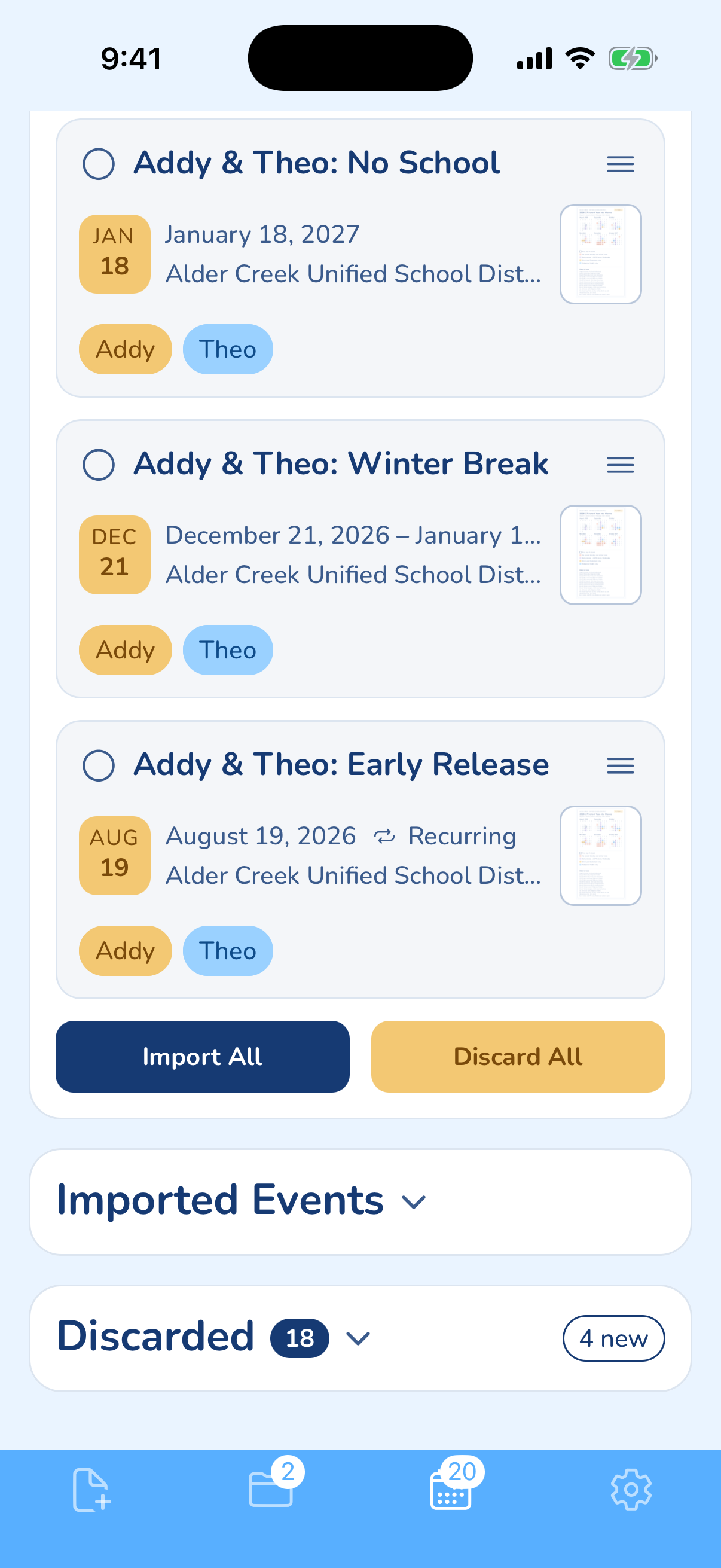
With KidsFoldr, you snap the flyer, the district calendar page or the coach's schedule, and every date on it lands on your family calendar with no typing: a weekly practice as one repeating event and, on the season schedule, only your kid's games (Smart Extract). Each event links back to its paper in the calendar entry's notes, one tap away on your phone, so you scan the flyer for peace of mind, then toss it with no guilt. The paper is filed under the right kid, grade and type as it arrives, so with two kids and a new flyer every day, nothing slips.
KidsFoldr puts those dates on the Google, iCloud or Outlook calendar you choose, or several at once, and Skylight shows that calendar for free: Google and iCloud sync both ways, Outlook comes in one way. The school email can go in too, forwarded with Email Papers and Events.
Screenshots
If not this, then
FAQ
Is Skylight Calendar worth it?
Yes, for a family that will read a calendar on the wall: once you own the screen, the calendar is free. Pay for Calendar Plus only if you'll use Magic Import to read flyers and school emails.
Do you need Skylight Plus?
No. Calendar Plus, $79 a year, adds Magic Import, meal planning, the photo screensaver, Rewards and Disney Mode. The calendar, sync, chores and lists work without it.
What does Skylight do without a subscription?
It shows and syncs your calendars (Google and iCloud both ways), runs chores, routines and lists, and lets you create a Profile and a color for each person in the app. The phone app is included.
Can Skylight read a school flyer?
With Calendar Plus, yes: photograph it in the phone app or forward the email to your Skylight's address, and it turns the dates into events. Skylight doesn't say what it does with a page of many dates.
Why is Skylight Plus sometimes listed at $39?
That's Frame Plus, the plan for Skylight's photo frames. The calendar plan is Calendar Plus, at $79 a year.
Is there a cheaper alternative to Skylight?
Yes: a free calendar app on everyone's phone. Google Calendar is free to download on iPhone and Android, Cozi has a free version, and Skylight's own app works without a screen for calendars, lists and tasks.
Read next in this cluster
Sources
- Skylight Calendar | The Digital Calendar for Busy Families (10" Calendar) (checked Oct 28, 2026)
- Skylight Calendar | The Digital Calendar for Busy Families (15" Calendar 2) (checked Oct 28, 2026)
- Skylight Calendar Max | The Smart Calendar for Busy Families (checked Oct 28, 2026)
- Skylight Calendar Comparison Chart | Explore Sizes, Features & More (checked Oct 28, 2026)
- Skylight Calendar | Smart Family Calendar (checked Oct 28, 2026)
- Skylight Calendar Plus | Digital Calendar Upgraded Subscription (checked Oct 28, 2026)
- Skylight Plus | Frame Plus Subscription (checked Oct 28, 2026)
- Skylight help center, Does Skylight Calendar require a subscription? (checked Oct 28, 2026)
- Skylight help center, What is Calendar Plus? (checked Oct 28, 2026)
- Skylight help center, Can I use the same Plus subscription on all my Calendars and Frames? (checked Oct 28, 2026)
- Skylight help center, How do I link my Calendar Plus subscription? (checked Oct 28, 2026)
- Skylight help center, What does a Skylight Calendar cost? (checked Oct 28, 2026)
- Skylight help center, About Assistant (checked Oct 28, 2026)
- Skylight help center, Subscription (checked Oct 28, 2026)
- Skylight help center, Free Trial (checked Oct 28, 2026)
- Skylight help center, Skylight Sidekick (checked Oct 28, 2026)
- Skylight help center, Import Calendar Events (checked Oct 28, 2026)
- Skylight help center, Email Events, Recipes, Menus, and Photos With Sidekick (checked Oct 28, 2026)
- Skylight help center, How To Use Magic Import (checked Oct 28, 2026)
- Skylight help center, [Feature] Edit Drafts of Magic Imports (checked Oct 28, 2026)
- Skylight help center, The Calendar Tab (checked Oct 28, 2026)
- Skylight help center, How do I get my Skylight Cal's email address and 6-digit code? (checked Oct 28, 2026)
- Skylight help center, Sending a single event from Google Calendar to Skylight (checked Oct 28, 2026)
- Skylight help center, What does Skylight Calendar sync with? (checked Oct 28, 2026)
- Skylight help center, Skylight Calendar Two-Way Sync with Google Calendar (checked Oct 28, 2026)
- Skylight help center, Skylight Calendar Two-Way Sync with Apple iCloud Calendar (checked Oct 28, 2026)
- Skylight help center, Skylight Calendar One-Way Sync with Google Calendar (checked Oct 28, 2026)
- Skylight help center, How to sync a Cozi calendar (checked Oct 28, 2026)
- Skylight help center, What are Skylight Calendar Profiles? (checked Oct 28, 2026)
- Skylight help center, How to set profiles up for your family (checked Oct 28, 2026)
- Skylight help center, Sharing Access To Calendar (checked Oct 28, 2026)
- Skylight help center, Can I Use My Calendar Without Wi-Fi Access? (checked Oct 28, 2026)
- Skylight help center, Sign Up for a Skylight Account Without a Device (checked Oct 28, 2026)
- Skylight help center, Refund and Return Policy (checked Oct 28, 2026)
- Skylight help center, The Skylight Promise (checked Oct 28, 2026)
- Skylight help center, Managing Your Frame / Calendar Plus Subscription (checked Oct 28, 2026)
- Skylight help center, If I cancel my Frame / Calendar Plus subscription before its expiration date, can it still remain active until the end of the year? (checked Oct 28, 2026)
- Skylight App on the App Store (checked Oct 28, 2026)
- Skylight on Google Play (checked Oct 28, 2026)
- Google Calendar on the App Store (checked Oct 28, 2026)
- Google Calendar on Google Play (checked Oct 28, 2026)
- Share your calendar - Computer - Google Calendar Help (checked Oct 28, 2026)
- Cozi Family Calendar & Organizer App | Free Shared Planner (checked Oct 28, 2026)