
Turn a sports schedule into calendar events
Snap the season schedule, or drop in the PDF. Every game comes back as an event, with the level, the time and the gym.
- Reads grids with Freshman, JV and Varsity side by side.
- Keeps bus times and away addresses with each game.
- No signup. Share the result with one link.
Limited by connection, not by login. Your file is read, then discarded. We keep nothing.
Games found
This schedule had more games than the free tool reads at once. The ones below are complete. The KidsFoldr app reads the rest.
Uncheck anything you don't want. The file works in Apple Calendar, Google Calendar and Outlook, and it says KidsFoldr inside, so it still shows where it came from after it has been forwarded.
Try it on a real schedule
Here is the kind of schedule this tool is for. One month, one school, three levels on one grid.
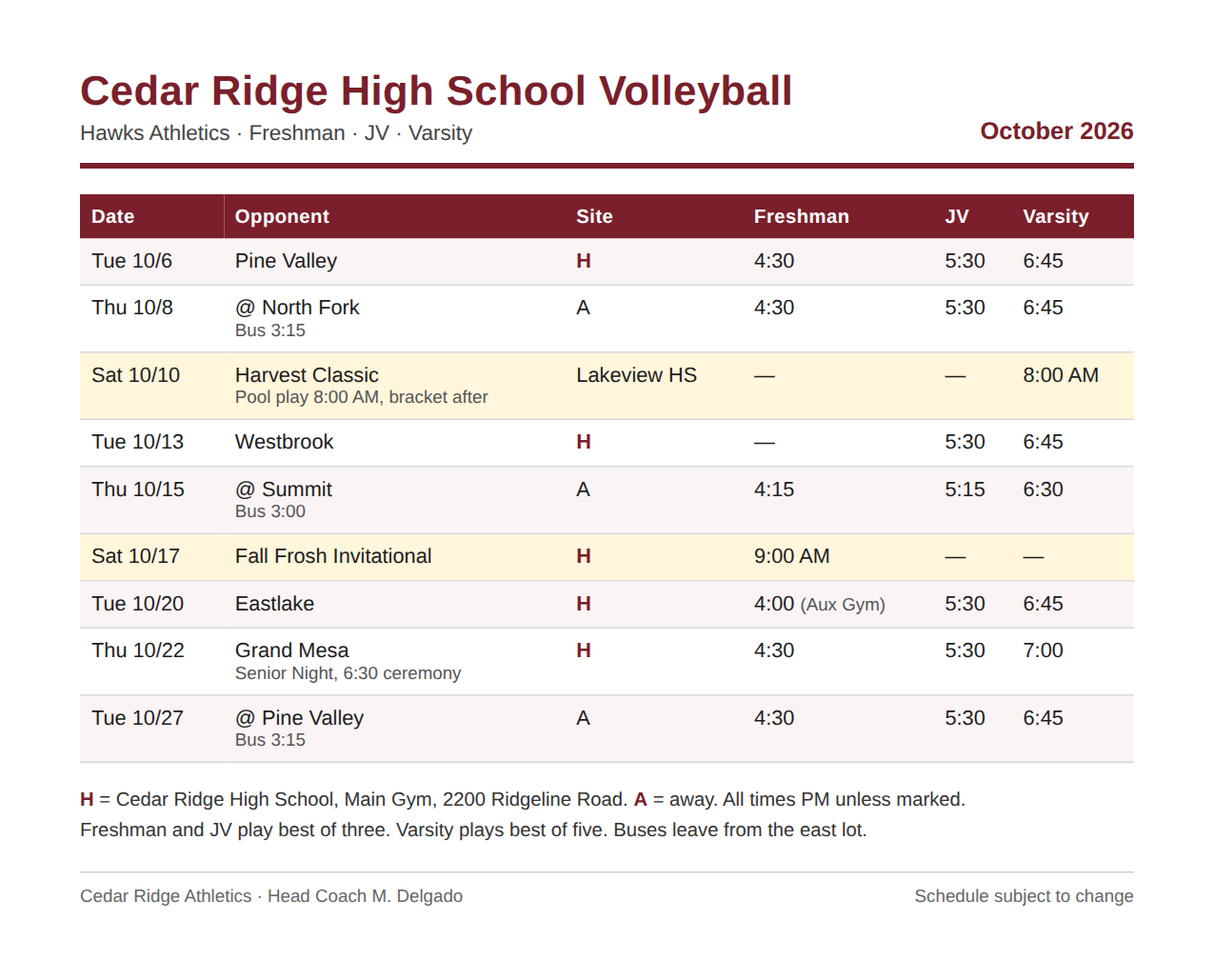
Each row is one night, but it holds up to three games. Freshman plays first, then JV, then Varsity, each at its own time.
A dash means that level has no game. The two Saturdays belong to one level each. Away games print a bus time in small type. The key at the bottom gives the home gym's address; the away gyms get a name and nothing more. "All times PM unless marked" is written once, in the fine print.
What the tool found
We ran this schedule through the tool on Sept. 28, 2026. It took about 30 seconds and found 22 games: seven Freshman, seven JV and eight Varsity. Every game has its own time, and the dashes were left out.
| Date | Game | Freshman | JV | Varsity |
|---|---|---|---|---|
| Tue, Oct. 6 | Pine Valley (home) | 4:30 PM | 5:30 PM | 6:45 PM |
| Thu, Oct. 8 | At North Fork, bus 3:15 | 4:30 PM | 5:30 PM | 6:45 PM |
| Sat, Oct. 10 | Harvest Classic, Lakeview HS | No game | No game | 8:00 AM |
| Tue, Oct. 13 | Westbrook (home) | No game | 5:30 PM | 6:45 PM |
| Thu, Oct. 15 | At Summit, bus 3:00 | 4:15 PM | 5:15 PM | 6:30 PM |
| Sat, Oct. 17 | Fall Frosh Invitational (home) | 9:00 AM | No game | No game |
| Tue, Oct. 20 | Eastlake (home) | 4:00 PM, Aux Gym | 5:30 PM | 6:45 PM |
| Thu, Oct. 22 | Grand Mesa, Senior Night | 4:30 PM | 5:30 PM | 7:00 PM |
| Tue, Oct. 27 | At Pine Valley, bus 3:15 | 4:30 PM | 5:30 PM | 6:45 PM |
Home games carry the Main Gym address from the key. Away games carry the other school's name and the bus time, because the schedule prints no address for them. The Freshman game on Oct. 20 is in the Aux Gym, and Senior Night notes the 6:30 ceremony.
Only your kid's games, with every address, in the app
Your kid plays one level, so 14 of those 22 games are not theirs. In the free tool, uncheck them before you download.
In the KidsFoldr app, Smart Extract does that for you. Add Varsity Volleyball to your kid's Family Profile, under Sports, Activities & Interests, with their school. Snap the same schedule, and only the eight Varsity games are kept.
Add Addresses fills in the rest. It takes a venue the schedule only names, like North Fork High School, and adds its street address, anchored by your zip code. Every away game gets one:
- Tue, Oct. 6: vs Pine Valley, 6:45 PM, Main Gym
- Thu, Oct. 8: at North Fork, 6:45 PM (bus 3:15), North Fork High School, 410 Fork Creek Drive
- Sat, Oct. 10: Harvest Classic, 8:00 AM, Lakeview High School, 900 Shoreline Boulevard
- Tue, Oct. 13: vs Westbrook, 6:45 PM, Main Gym
- Thu, Oct. 15: at Summit, 6:30 PM (bus 3:00), Summit High School, 88 Overlook Way
- Tue, Oct. 20: vs Eastlake, 6:45 PM, Main Gym
- Thu, Oct. 22: vs Grand Mesa, Senior Night, 7:00 PM (ceremony 6:30)
- Tue, Oct. 27: at Pine Valley, 6:45 PM (bus 3:15), Pine Valley High School, 1550 Valley Parkway
The other 14 games never reach your calendar. (The schools and their addresses are made up, like the schedule.)
About the sports schedule extractor
A season schedule is a grid, not a list. One row holds a date, an opponent and a site. The times hide in columns, one per level, and the fine print changes what they mean.
This tool reads the whole grid. It turns every filled cell into its own game, with the right time, the level in the title and the gym as the place. It skips the dashes. It carries the bus time and the key's addresses onto each game they belong to.
It is built for the schedule the coach hands out or the athletic office posts: a PDF, a screenshot of the website, or a photo of the sheet on the fridge.
What it reads
- School and club schedules, one team or several levels on one grid.
- Home and away columns, site keys and bus or departure times.
- Tournaments and invitationals, at their start time and site.
- Photos, screenshots and PDFs, typed or scanned, up to 10 pages.
Just your kid's games: Smart Extract
The free tool reads every level on the grid, so uncheck the games that are not your kid's before you download.
Smart Extract in the KidsFoldr app does it for you. It reads your kid's Family Profile, their school and a line like Varsity Volleyball, and keeps only their games. The rest never reach your calendar.
Every away gym's address: Add Addresses
Schedules often name the away gym and nothing more. The free tool keeps the name the paper prints.
Add Addresses in the KidsFoldr app fills in the street address, anchored by your zip code. "At North Fork" becomes a game with a full address, ready for directions.
The schedule, one tap from every game
Every game the KidsFoldr app adds links back to its schedule, right in the calendar entry's notes. The whole season is one tap from any game, filed under the right kid.
So the sheet on the fridge can go. Scan it for peace of mind, then toss it with no guilt.
What happens to your file
Your file goes to our server, which asks Claude, an AI model made by Anthropic, to read it. The games come back to your browser. We do not save the file or the games.
The only thing we keep is a count of how many papers came from your connection, stored as a scrambled code. That keeps the tool free. The count is deleted after two days.
Questions about this tool
Do I need an account?
No. Choose a photo or PDF of the schedule and download the games. There is no signup, no email and no popup.
Can it pull out just my kid's level?
In the free tool, uncheck the levels you don't need before you download. In the KidsFoldr app, Smart Extract does it for you: put the level and sport, like Varsity Volleyball, in your kid's Family Profile, and only their games are kept.
What about tournaments?
A tournament comes back as one event at its start time, with its site. Pool play and bracket times usually come later on their own sheet. Run that sheet when it arrives.
Does it find the address of an away gym?
The free tool uses the addresses the schedule prints. When a schedule names only the school, the KidsFoldr app's Add Addresses fills in the street address, anchored by your zip code.
How do I get the games onto my phone?
The download is an .ics file, the standard calendar format. On an iPhone, open it from Files or Mail and tap Add All. On Android or a computer, import it into Google Calendar or Outlook.
Can I send the games to the other parent?
Yes. After you choose which games to keep, copy the shareable link. Anyone who opens it sees the same list and can download it. The games travel inside the link itself, so nothing is stored on our side.
Is there a limit?
Three schedules an hour and ten a day from one connection. A full season on one page may hold more games than it reads at once. That keeps the tool free for everyone.
What does the KidsFoldr app add?
Snap any paper and the app files it under the right kid, grade and type, searchable by any word on it. Its events go straight to the calendar you already use, with a color for each person, and Smart Extract keeps only your kid's games.