ICS validator: check and fix an .ics file that won't import
Drop in the calendar file from the school, the team or the club. See every line that breaks the standard, which apps it trips, and download a repaired copy.
- Nothing is uploaded. The file is read and fixed on this page.
- Each problem names its line, the rule and the apps it breaks.
- Safe repairs are made for you. Anything that needs your judgment is left to you.
Runs entirely in your browser. Your file is never uploaded, and we keep nothing.
Results
The fixed file names KidsFoldr in its PRODID line, so it still shows where it was repaired after it has been forwarded. Anything marked "Needs you" is still in it, unchanged.
Why an .ics file won't import
An .ics file is plain text in a format called iCalendar. Its rules are written down in one standard, RFC 5545, and every calendar app reads it.
But each app forgives different mistakes. A file that opens on one phone can fail on a computer, or import with every time off by hours. Here is what each app documents, and what users report.
Google Calendar
- Import works on a computer only: Settings, then Import & export, then choose the file and a calendar (Google).
- Google works with files of 1 MB or smaller. A bigger file usually brings "Google Calendar is temporarily unavailable". Export a shorter date range, or split the file (Google).
- "Processed x of y events" usually means some events cannot be read. "Processed zero events" can mean a ZIP file that was not unpacked, or Import clicked twice. "The connection to the server was reset" usually means a badly formatted file (Google).
- Guests are not imported with an event (Google).
- A developer checked dozens of files that Google Calendar on Android refused with "Unable to launch event". Every one was missing DTSTAMP, and adding that one line fixed them (Terence Eden).
- Users report a "you do not have sufficient access" error when a file's UID is already on the calendar. Changing or deleting the UID line fixed it (user reports).
Outlook and Exchange
Microsoft publishes how Exchange, the server behind Outlook in many workplaces, departs from the standard when it imports a file. It fails the whole import on any of these (Microsoft):
- A time zone name (TZID) with no matching VTIMEZONE block.
- An event with no UID, or with two.
- An event with no start (DTSTART), or an end before its start.
- A date it cannot read, or one before 1601 or after 4500.
- A repeat rule it does not support.
- More than one VCALENDAR in the file.
Exchange's documentation also says it needs a METHOD line. Adding METHOD:PUBLISH is a safe fix. In other ways Exchange is forgiving: it accepts any line ending and any line length, and fills in a missing DTSTAMP with the import time.
One habit is worth knowing. Exchange silently skips a line that breaks the format, so a lost line of a description just disappears (Microsoft).
In new Outlook for Windows, double-clicking an .ics file often does nothing. Users found the import dialog appears only after switching to the Calendar view (Microsoft Q&A). An imported file is a snapshot and never updates. A subscribed calendar refreshes, which Microsoft says can take more than 24 hours.
Apple Calendar
On a Mac, choose File, then Import, or drag the file onto Calendar, then pick the calendar (Apple). Apple's guide describes no error messages.
On iPhone, users on iOS 18 reported that opening an .ics file shows the event with no way to add it. The workaround posted there: save the file to Files, then drag it onto the Calendar app. Apple has not confirmed a cause. So a valid file can still fail to open, and the fix is in the app, not the file.
The faults with the best evidence
No source counts how often each fault happens. These are the ones with documentation or repeated reports behind them.
- No DTSTAMP. Google Calendar on Android refused the files. Exchange fills it in.
- A missing or shared UID. Exchange fails with no UID. Google refuses a UID already on the calendar.
- A time zone with no VTIMEZONE. When a TZID, even a Windows name like "Eastern Standard Time", has no matching VTIMEZONE, Exchange fails the import. Google and older Outlook imported at the wrong time. Include a VTIMEZONE, and use an IANA name such as
America/New_York. - A local time written with a Z. A Z means UTC. The file imports fine, but every event is off by your offset from UTC.
- An all-day end on the same day. The end date is the day after the last day. Older Outlook made zero-length items from the same-day version.
- An end before the start. Exchange fails the import.
- A file over 1 MB, for Google Calendar.
- METHOD:REQUEST with several events. Users report only the first event gets added from email. Switching to PUBLISH is the usual fix.
- A repeat rule an app does not support. Exchange fails the import.
- A broken line, like a raw line break inside a description. Exchange drops it.
Try it on a broken school calendar
Here is the kind of file this tool is for. The Brambleford Elementary PTA sends the Pell family its fall calendar: five events for Juniper in 3rd grade and Theo in 1st. The file will not import.
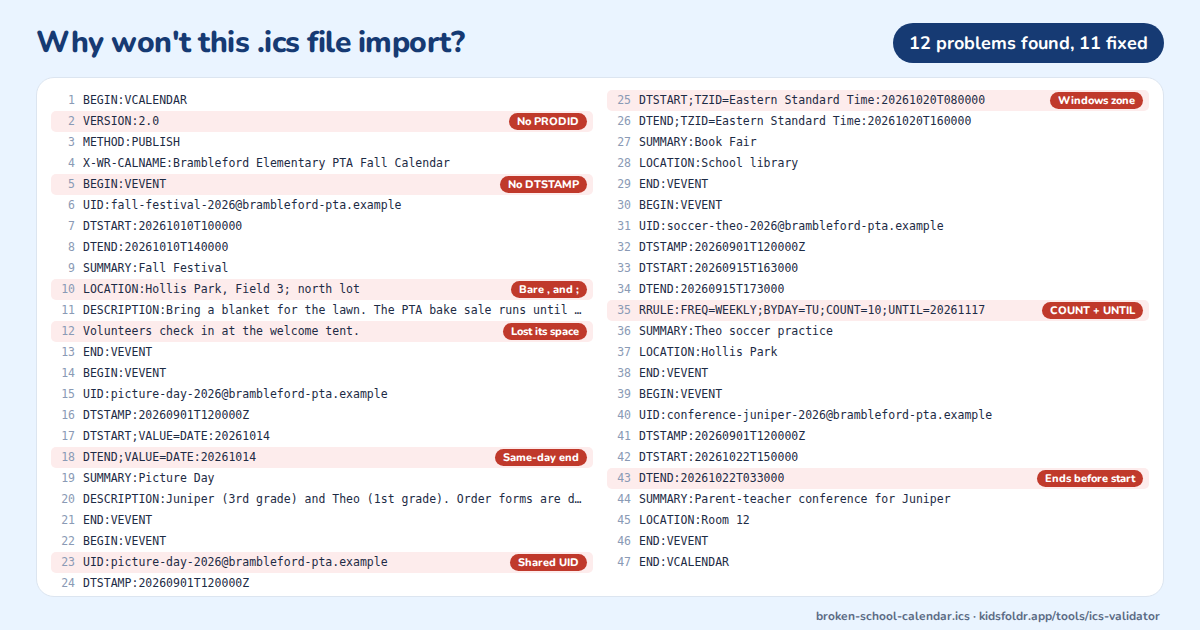
It looks fine at a glance. Every event has a name, a date and a place.
The faults are small: a missing line, a copied ID, one AM that should be PM. Any one of them can stop an import, or put an event at the wrong time.
What the tool found
The check takes under a second. It reports 12 problems in 5 events and fixes 11 of them:
- The calendar has no PRODID line. Fixed: added.
- Fall Festival has no DTSTAMP. Fixed: added, in UTC.
- Its location,
Hollis Park, Field 3; north lot, has a bare comma and semicolon. Fixed:Hollis Park\, Field 3\; north lot. - Line 12 of its description lost its leading space, so it reads as a broken line. Fixed: joined back as a new line of text, marked for you to check.
- Picture Day is all day, with an end date equal to its start. Fixed: the end moves to the next day, so it is a one-day event.
- The Book Fair shares Picture Day's UID, from a copy and paste. Fixed: a new UID.
- The Book Fair uses the Windows time zone "Eastern Standard Time" with no VTIMEZONE. Fixed: renamed
America/New_York, with a VTIMEZONE block added. - Theo's soccer practice repeats with both
COUNT=10andUNTIL. Both stop after the same 10 Tuesdays, so the fix keeps UNTIL, written as a local date and time like the start. - The file uses bare line feeds, and two lines run past 75 bytes. Fixed: CRLF line endings and folded lines.
Two notes need nothing. Three events use a local clock time with no time zone, which is valid and right for school events. And the file says PUBLISH with no ORGANIZER. We found no app that refuses one.
The one it leaves to you
Juniper's parent-teacher conference starts at 3:00 PM and ends at 3:30 AM the same day:
DTSTART:20261022T150000
DTEND:20261022T033000
That is almost certainly 3:30 PM. But the tool cannot know it, so it says so, suggests DTEND:20261022T153000 and leaves the line alone. Change it, then check the file again: the fixed copy then comes back with no problems.
About the .ics validator
The checker reads the file the way a strict app would. It unfolds the lines, pairs every BEGIN with its END, then checks each calendar, event and time zone against the standard's rules.
A rule the standard says MUST be followed is an error. One it says SHOULD be followed, or one a major app is documented to trip on, is a warning. Things that are valid but worth knowing are notes.
What it checks
- BEGIN:VCALENDAR and END:VCALENDAR, and every BEGIN matched by its END.
- VERSION:2.0 and PRODID, once each, and at least one event.
- A UID and a UTC DTSTAMP on every event, and no two events sharing a UID.
- DTSTART, and an end that is later than the start, with DTEND or DURATION but not both.
- Dates and times written the standard way, with
VALUE=DATEon dates, and no Z next to a TZID. - All-day ends that fall on the day after the last day.
- A VTIMEZONE for every time zone a time names, and a complete one.
- Repeat rules: FREQ first, never both COUNT and UNTIL, and UNTIL the same kind of value as the start.
- Backslashes before commas, semicolons and backslashes in text.
- CRLF line endings, lines folded at 75 bytes, no empty lines and no byte order mark.
- METHOD, which Exchange needs, and the 1 MB limit Google sets.
What it repairs
Only what has one right answer. Every repair is listed in the results, so you can see what changed.
- Line endings, line folding, a leading byte order mark and empty lines.
- A missing VERSION or PRODID, and METHOD:PUBLISH when the file has no guests.
- Missing DTSTAMPs, a DTSTAMP without a Z, and missing or shared UIDs.
- An all-day end date on the same day, a timed end equal to the start, and DTEND with DURATION when the two agree.
- Dates written with dashes, an offset like -0800, or a missing VALUE=DATE.
- Backslashes, commas and semicolons in text, and a continuation line that lost its leading space (marked for you to check).
- Repeat rules: FREQ moved first, UNTIL changed to match the start, and COUNT with UNTIL when both stop on the same date.
- An unclosed BEGIN, when where it ends is clear.
- Time zones: a Windows name renamed to its IANA name from the Unicode CLDR list, and a VTIMEZONE built from your browser's time zone data for any zone that lacks one.
What it leaves to you
Anything that needs the author's intent: an end before its start, a Z next to a TZID, an impossible date, COUNT and UNTIL that disagree, a stray END, a time zone name it cannot look up. Each one says what to change. Fix it by hand, then run the check again.
No file to fix at all
The calendar file is a middle step between the paper and your calendar. KidsFoldr skips it. Snap the flyer or the school calendar, and every date lands on your family calendar with no typing. Each event links back to its paper in the calendar entry's notes, one tap away.
The paper itself is filed under the right kid, grade and type, with no sorting. So it can go. Scan it for peace of mind, then toss it with no guilt.
What happens to your file
Nothing leaves your browser. The file is read, checked and repaired by this page, and the fixed copy is made on your device. We never see it, and we keep nothing.
Questions about this tool
Is my file uploaded?
No. The file is read, checked and repaired by this page, in your browser. Nothing is sent to a server, and nothing is saved.
Why does Google Calendar say "Processed x of y events"?
Google says it usually means some events in the file cannot be read. Run the file through the checker to find which ones, then import the fixed copy. "Processed zero events" can also mean a ZIP file that was not unpacked, or the Import button clicked twice.
Why are my imported events at the wrong time?
Usually a time zone problem. Either a time names a zone with no VTIMEZONE block, or a local time was written with a Z, which means UTC. The checker fixes the first. For the second, only you know which time was meant: check one event after import.
Why does my all-day event show as zero length or end a day early?
In an .ics file, the end date of an all-day event is the day after the last day. A one-day event on the 14th ends on the 15th. The checker moves an end date that equals the start to the next day.
Why does nothing happen when I open an .ics file in new Outlook?
Many users report it. The import dialog appears only after you switch to the Calendar view. Then pick a calendar and click Import. The file itself may be fine.
Will the fixed file import everywhere?
It removes every fault the checker marks as fixed, and those are the causes Google, Microsoft and user reports name. Anything marked "Needs you" is still in the file until you change it. A problem with the app itself, like new Outlook ignoring a double-click, is outside the file.
Does the repair change my events?
Only where the meaning is certain: missing IDs and time stamps, backslashes in text, line endings and folding, an all-day end date, a Windows time zone name and its VTIMEZONE block. It never guesses at a time, a date or which of two rules you meant.
Do I need an account?
No. There is no signup, no email and no popup.
What does the KidsFoldr app add?
No file to fix at all. Snap the school's paper, and every date lands on your family calendar with no typing, each event linked back to its paper. The paper itself is filed under the right kid, grade and type, so it can go.
Sources
- RFC 5545: Internet Calendaring and Scheduling Core Object Specification (iCalendar)
- RFC 5546: iCalendar Transport-Independent Interoperability Protocol (iTIP)
- RFC 3629: UTF-8, section 6 on the byte order mark
- Google Calendar Help: Import events to Google Calendar
- Google Calendar Help: Fix problems importing events
- Microsoft: [MS-STANXICAL] Exchange iCalendar standards support
- Microsoft Support: Import or subscribe to a calendar in Outlook.com
- Microsoft Q&A: Issue to open an ICS file in new Outlook
- Microsoft Q&A: Outlook importing only the first event of a REQUEST file
- Apple: Import or export calendars on Mac
- Apple Community: .ics files on iOS 18
- Terence Eden: Google Calendar "Unable to launch event" caused by missing DTSTAMP
- OhadSoft: Google Calendar "sufficient access" import error
- Stack Overflow: a nonstandard TZID imported hours off in Google Calendar
- Stack Overflow: Outlook moved a time zone with no VTIMEZONE by an hour
- Stack Overflow: local times written with a Z
- Stack Overflow: all-day DTEND in Outlook
- Unicode CLDR: Windows time zone names to IANA names