Turn a school flyer into calendar events
Photograph the paper that came home Friday, or drop in the PDF. Every date comes back as an event for any calendar.
- No signup, no email, no popup. It works on the first visit.
- Share the result with one link, so the other parent gets the same dates.
- Reads a photo taken at an angle on a kitchen counter.
Limited by connection, not by login. Your file is read, then discarded. We keep nothing.
Events found
This paper had more events than the free tool reads at once. The ones below are complete. The KidsFoldr app reads the rest.
Uncheck anything you don't want. The file works in Apple Calendar, Google Calendar and Outlook, and it says KidsFoldr inside, so it still shows where it came from after it has been forwarded.
Try it on a real flyer
Here is the kind of paper this tool is for. One page, five items, and not a single year printed on it.
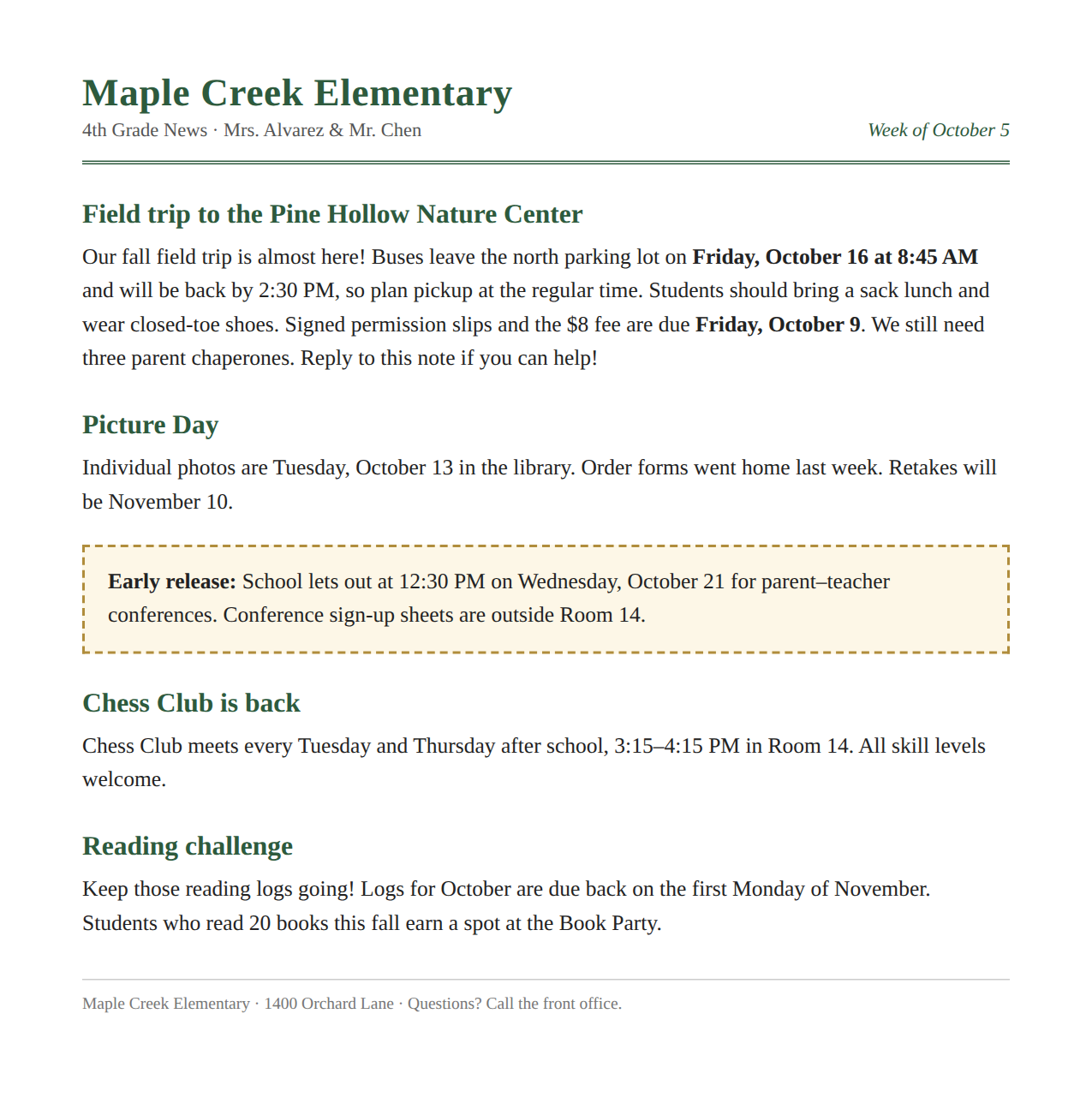
The field trip is the obvious event. The permission slip, due a week earlier, is the one people miss. It sits in the middle of the same paragraph.
The early release day hides in a box. Chess Club repeats twice a week, so it should come back as one repeating event, not forty. The reading log is due "the first Monday of November", which only works if you count.
What the tool found
We ran this flyer through the tool on Sept. 28, 2026. It took about 20 seconds and found seven events:
- Permission slip and $8 fee due, Friday, Oct. 9 (all day).
- Field trip to Pine Hollow Nature Center, Friday, Oct. 16, 8:45 AM to 2:30 PM.
- Picture Day, Tuesday, Oct. 13 (all day), in the library.
- Early release, Wednesday, Oct. 21 at 12:30 PM.
- Chess Club, every Tuesday and Thursday, 3:15 to 4:15 PM in Room 14, from Oct. 6 to the end of the school year.
- Picture Day retakes, Tuesday, Nov. 10 (all day).
- October reading logs due, Monday, Nov. 2 (all day).
No year is printed on the flyer. The tool worked it out from the date it ran.
About the flyer to calendar tool
A school flyer is not a calendar. It is a page of news with the dates buried inside. One line says the bus leaves Friday at 8:45. Another says the permission slip is due a week before that.
This tool reads the whole page the way you would, then writes each date down as an event. The field trip becomes an event with a start time and a place. The slip deadline becomes its own all-day reminder. A club that meets every Tuesday and Thursday becomes one repeating event.
It is built for the paper that comes home in a backpack. That means a photo taken on a kitchen counter, at an angle, in bad light. It also means the PDF the school emailed, or a scan of either.
What it reads
- Photos from a phone camera, including crooked and shadowed ones.
- PDFs, typed or scanned, up to 10 pages. For a long, dense PDF, try its first pages.
- Newsletters, flyers, permission slips and week-at-a-glance sheets.
- Repeating events written in words, like "every Tuesday and Thursday".
- Dates with no year printed, placed in the right year.
- Dates written as words, like "the first Monday of November".
- Handwritten notes and faded copies.
Just your family's events: Smart Extract
A newsletter covers the whole school. The free tool reads every event on it, so uncheck the ones that are not yours before you download.
Smart Extract in the KidsFoldr app does it for you. It reads each kid's Family Profile and keeps only the events that are theirs. Dates already past are dropped too.
Every place's address: Add Addresses
A flyer often names a place and nothing more, like "the library" or "Pine Hollow Nature Center". The free tool keeps the name the paper prints.
Add Addresses in the KidsFoldr app fills in the street address, anchored by your zip code, so every event is ready for directions.
The paper, one tap from the event
Every event the KidsFoldr app adds links back to its paper, right in the calendar entry's notes. The flyer is one tap from the field trip, filed under the right kid.
So the paper can go. Scan it for peace of mind, then toss it with no guilt.
What happens to your file
Your file goes to our server, which asks Claude, an AI model made by Anthropic, to read it. The events come back to your browser. We do not save the file or the events.
The only thing we keep is a count of how many papers came from your connection, stored as a scrambled code. That keeps the tool free. The count is deleted after two days.
Questions about this tool
Do I need an account?
No. Choose a photo or PDF and download the events. There is no signup, no email and no popup.
How do I get the events onto my phone?
The download is an .ics file, the standard calendar format. On an iPhone, open it from Files or Mail and tap Add All. On Android or a computer, import it into Google Calendar or Outlook.
Why is a date wrong?
Usually it is the year. Most flyers never print one, so the tool uses the current year. Uncheck any event that looks off before you download.
Can I send the events to my co-parent?
Yes. After you choose which events to keep, copy the shareable link. Anyone who opens it sees the same list and can download it. The events travel inside the link itself, so nothing is stored on our side.
Is there a limit?
Three papers an hour and ten a day from one connection. A very long paper may be more than it reads at once. That keeps the tool free for everyone.
What does the KidsFoldr app add?
Snap any paper and the app files it under the right kid, grade and type, searchable by any word on it. Its events go straight to the calendar you already use, with a color for each person. Lists go to Reminders or Google Tasks.