Two years from now, can you find that one report card? We ranked eight apps on that single question, with hands-on testing and each app's documented features.
K
KidsFoldrThe KidsFoldr team
Updated Prices checked
KidsFoldr is one of the apps ranked here, and we make it. We take no affiliate commission from any product on this list. The table decides the order.
Our picks at a glance
The best app to save kids schoolwork is KidsFoldr, if you never want to file a paper yourself. The best free option is Google Drive, if you will pick the folders.
The Friday folder holds papers you will need again: a report card, a signed permission slip, an IEP progress report. This test counts the filing you did not have to do, and whether you still have a copy after a lost phone.
The full comparison
Ranked on the axis above. Scroll sideways on a phone. The app name stays put.
App
Two years later, can you find that one paper?
Files it by kid, without you
Knows the grade
Finds a word on the paper
Keeps a copy outside the app
Price
KidsFoldr
YesFiled and searchable
YesNo tap
YesGrade on every paper
YesAny word, every paper
YesYour Drive or iCloud, in kid and grade folders
$3 a month. 14-day free trial, no card.
Google Drive
With workYou pick every folder
No
No
YesSearchable PDFs
YesPDFs
Free, 15 GB shared
Apple Notes
With workYou sort the notes
No
No
YesText in scans
With workPDF export keeps scan page 1 only
Free; 5 GB iCloud
Evernote
With workSmall free plan
No
No
YesHandwriting too
With workENEX or HTML, desktop app
Free to 50 notes; Starter $99 a year
Adobe Scan
With workYou make the folders
No
No
YesFree limit unclear
YesPlain PDFs in Adobe's cloud
Free; paid tiers
Genius Scan
With workOn Ultra
No
No
With workOnly on Ultra
With workIf you export PDFs
Free; Ultra $39.99 a year
Artkive
RarelyYou label each piece
NoYou label each photo
With workYou type it
Not documented
With workWebsite, one image at a time
Free to 40 images; $33 to $143 a year
Files and iCloud Drive
RarelyOnly if you name files well
No
No
Not documentedSearch by file name
YesPDFs
Free; 5 GB iCloud
How we picked
We ran hands-on tests and checked each app's documented features: vendor pages, store listings and help centers for competitors, and our own documentation for KidsFoldr.
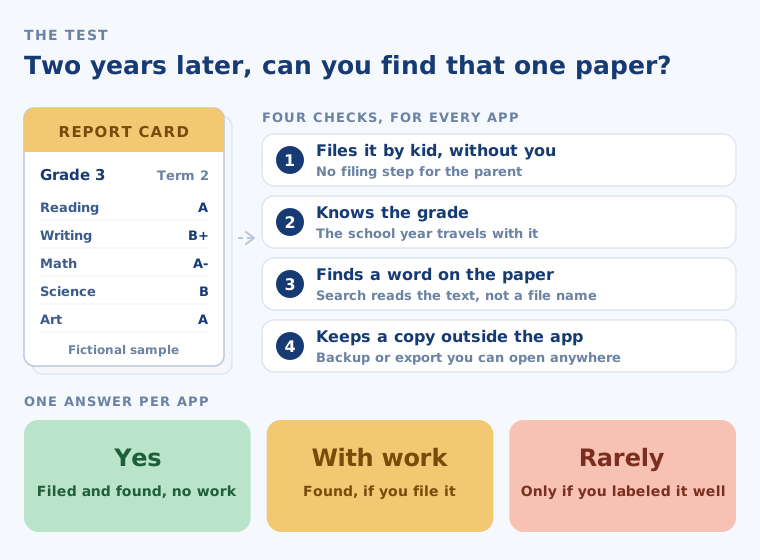
Four checks matter: filing by kid without you, knowing the grade, finding a paper by a word on it, and keeping a copy outside the app.
The one test, in four checks. Every app in the table gets one of three answers.
Each app below gets a color for each check, in the table and in its own entry.
Yes No work for you
With work You file, export or pay for it
No Or rarely, or not documented
"Not documented" means the vendor's pages do not say. It does not mean the feature is missing, but you cannot count on it, so it scores red.
11 appschecked
4 checksscored for every app
$0affiliate income
Every app, ranked
KidsFoldr ranks first because it is the only one of these eight that files a paper by kid and grade as you snap it.
1
KidsFoldr
Best if you never want to file anything yourself
$3 a month. 14-day free trial, no card.
Two years later, can you find that one paper?
Yes. It files the paper by kid and grade, and the Papers tab search finds it by any word on the page.
Files by kidYes
Knows the gradeYes
Finds a wordYes
Copy outside the appYes
Snap or scan the report card, share a PDF or office file, or forward the school's email. By Person shows each kid's folder in grade sections. Search also matches kid, grade, type or date, even offline. Tap a paper's title or date to change it.
Good
No filing step. Turn on automatic backup, and every paper and its text go to KidsFoldr Cloud as they are filed. One tap copies them to your own Google Drive or iCloud in kid and grade folders. Restore brings them back to a new phone.
Bad
Want a printed book? KidsFoldr exports a PDF portfolio, and printing it is up to you.
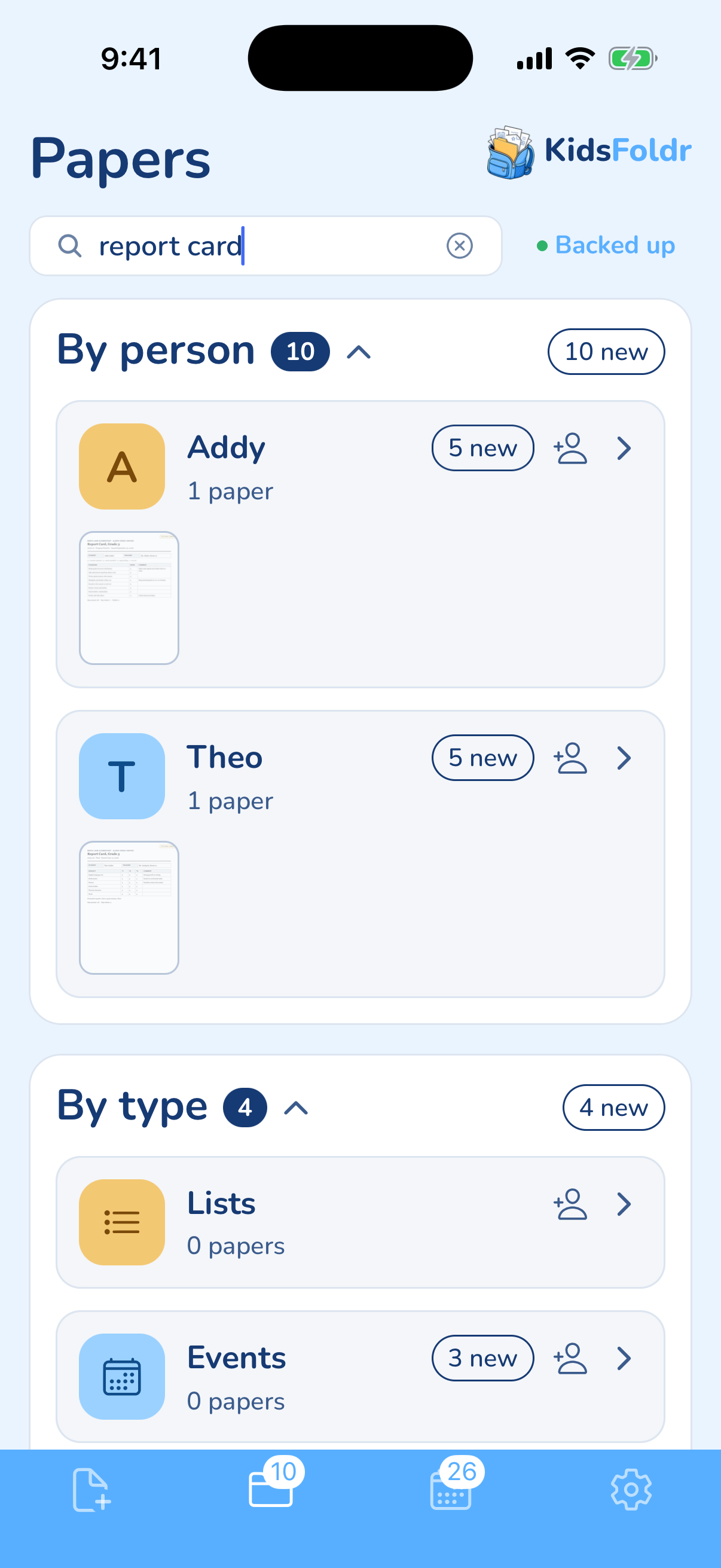
Search "report card," and each kid's folder narrows to theirs: Addy's from 3rd grade, Theo's from 5th. Addy and Theo are fictional.
2
Google Drive
Best free option
Free, 15 GB shared with Gmail and Google Photos
Two years later, can you find that one paper?
With work. The words are searchable, but you choose a folder for every scan.
Files by kidNo
Knows the gradeNo
Finds a wordYes
Copy outside the appYes
Its app on iPhone and Android has a scanner that saves searchable PDFs. A folder tree is a real digital filing system for household paperwork, but you are the filer.
Good
It is free, and search covers the text inside files. Ordinary PDFs open anywhere.
Bad
Drive does not know which kid or grade. Filing every paper is on you.
3
Apple Notes
Best already on your iPhone
Free; iCloud includes 5 GB free
Two years later, can you find that one paper?
With work. Search finds text in scanned documents, but you sort the notes.
Files by kidNo
Knows the gradeNo
Finds a wordYes
Copy outside the appWith work
In a note, Scan Documents saves the paper as a PDF inside it. Notes search covers typed and handwritten text and the text in your scans.
Good
It is free and already on your iPhone, with nothing to install.
Bad
Exporting a note to PDF keeps only the first page of a multipage scan. A two-page IEP progress report does not leave cleanly.
4
Evernote
Free up to 50 notes; Starter $14.99 a month or $99 a year
Two years later, can you find that one paper?
With work. Its search reads text in images, PDFs and scans, including handwriting, but you build the notebooks.
Files by kidNo
Knows the gradeNo
Finds a wordYes
Copy outside the appWith work
You set up the notebooks and tags yourself. Its paid plans list advanced search of text and attachments.
Good
Its search is the strongest documented here. Free users can export ENEX or HTML files from the desktop app.
Bad
Free allows 50 notes, one notebook and one synced device. That is a school year of Friday folders, at most.
5
Adobe Scan
Free; paid tiers in the app
Two years later, can you find that one paper?
With work. It turns scans into searchable PDFs, but you make the folders.
Files by kidNo
Knows the gradeNo
Finds a wordYes
Copy outside the appYes
Adobe Scan is a scanner with text recognition. You file scans in folders you create.
Good
Scans save to Adobe's cloud, with 5 GB free when you sign up. You can also save plain PDFs to Dropbox or Google Drive.
Bad
Adobe does not say clearly how much text recognition is free, and paid tiers vary.
6
Genius Scan
Free; Ultra $39.99 a year
Two years later, can you find that one paper?
With work, and the words are searchable only on Ultra.
Files by kidNo
Knows the gradeNo
Finds a wordWith work
Copy outside the appWith work
Genius Scan is a scanner first. You sort with tags and document names.
Good
Scanning is free and unlimited, and processing stays on your phone. It is rated 4.9 from 1.4 million App Store ratings.
Bad
Scans stay on the phone unless you export them, and backup is a paid add-on. Export often.
7
Artkive
Best for printed art books
App free to 40 images, then $33 to $143 a year
Two years later, can you find that one paper?
Rarely, for a report card. You label each piece with child and grade, and no text search is documented.
Files by kidNo
Knows the gradeWith work
Finds a wordNot documented
Copy outside the appWith work
Artkive is two products: an app you photograph art with, and a Box service. Mail the box ($39 with shipping) and digitizing starts at $45 for 25 pieces.
Good
For art, it is the best documented option here. Staff photograph and label what you mail, and it prints books and framed mosaics.
Bad
It is built for artwork, not permission slips. Its help center describes website downloads one image at a time, with bulk download by paid request.
8
Files and iCloud Drive
Free; iCloud 5 GB free, iCloud+ from $0.99 a month (US)
Two years later, can you find that one paper?
Rarely, unless you name every file well. Apple's guide describes search by file name, folder name or type.
Files by kidNo
Knows the gradeNo
Finds a wordNot documented
Copy outside the appYes
On iOS 27, the scanner lives in the Preview app and saves a PDF. Naming it and filing it are up to you.
Good
It is free, and plain PDFs leave nothing to export.
Bad
Every report card needs a good file name, typed by you.
What we left out, and why
Not ranked, for these reasons.
Keepy
No Keepy kids' app in the App Store or Google Play, and its website and help center not working. We could not check one feature or price.
Canvsly
No app in either store and no published price. Its site ends in a contact form.
Microsoft Lens
No longer listed in the App Store or Google Play.
Dropbox and OneDrive
Same job as Google Drive on this test.
Notion
A workspace you design yourself; this list ranks ready-made apps.