Turn the school calendar PDF into calendar events
Drop in the district's year-at-a-glance PDF. Every break, holiday and early release comes back as an event for any calendar.
- Breaks come back as one event across every day off.
- A weekly early release comes back as one repeating event.
- No signup. Share the result with one link.
Limited by connection, not by login. Your file is read, then discarded. We keep nothing.
Dates found
This calendar had more dates than the free tool reads at once. The ones below are complete. The KidsFoldr app reads the rest.
Uncheck anything you don't want. The file works in Apple Calendar, Google Calendar and Outlook, and it says KidsFoldr inside, so it still shows where it came from after it has been forwarded.
Try it on a real calendar
Here is the kind of calendar this tool is for. One school year, ten months on one page, color-coded.
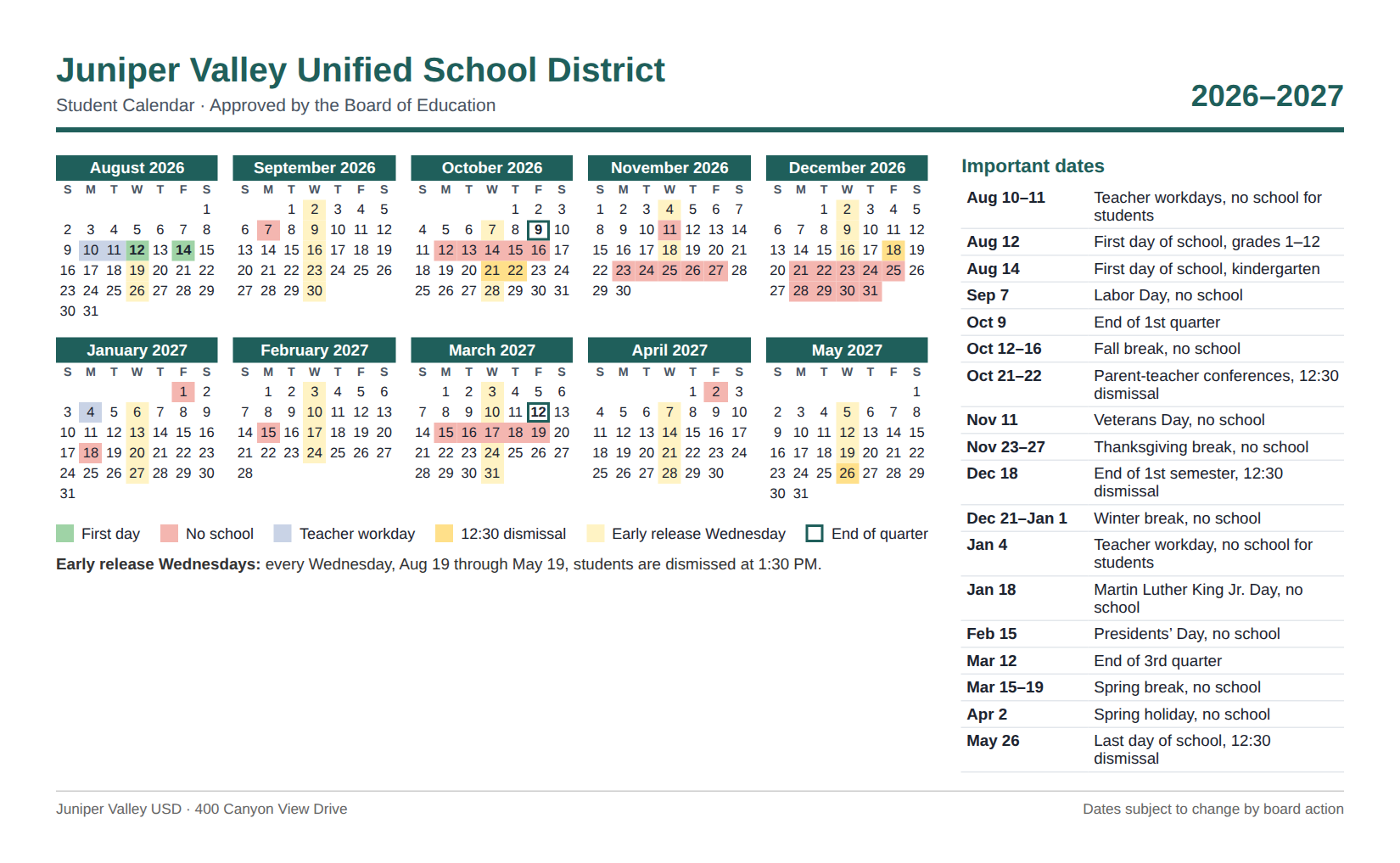
The year runs across two calendar years, August to May. The breaks are ranges, like Oct. 12 to 16. Kindergarten starts two days after everyone else.
Every Wednesday is an early release. The calendar says so once, in a note under the grid, not 38 times.
What the tool found
We ran this calendar through the tool on Sept. 29, 2026. It took about 30 seconds and found 19 events, the whole school year:
| When | Event |
|---|---|
| Aug. 10 to 11 | Teacher workdays, no school for students |
| Wed, Aug. 12 | First day of school, grades 1 to 12 |
| Fri, Aug. 14 | First day of school, kindergarten |
| Every Wednesday, Aug. 19 to May 19 | Early release, 1:30 PM |
| Mon, Sept. 7 | Labor Day, no school |
| Fri, Oct. 9 | End of 1st quarter |
| Oct. 12 to 16 | Fall break, no school |
| Oct. 21 and 22 | Parent-teacher conferences, 12:30 dismissal |
| Wed, Nov. 11 | Veterans Day, no school |
| Nov. 23 to 27 | Thanksgiving break, no school |
| Fri, Dec. 18 | End of 1st semester, 12:30 dismissal |
| Dec. 21 to Jan. 1 | Winter break, no school |
| Mon, Jan. 4 | Teacher workday, no school for students |
| Mon, Jan. 18 | Martin Luther King Jr. Day, no school |
| Mon, Feb. 15 | Presidents' Day, no school |
| Fri, Mar. 12 | End of 3rd quarter |
| Mar. 15 to 19 | Spring break, no school |
| Fri, Apr. 2 | Spring holiday, no school |
| Wed, May 26 | Last day of school, 12:30 dismissal |
August to December landed in 2026 and January to May in 2027. Each break is one event across every day off. The early release is one repeating event, every Wednesday from Aug. 19 to May 19.
About the school calendar PDF converter
A district calendar is a year on one page. It is built to be printed and taped inside a cabinet, not to be typed into a phone.
This tool reads the whole page: the list of dates, the legend and the notes under the grid. It turns every day off, half day and first day into an event. A break becomes one event across every day off. A day that repeats all year becomes one repeating event.
It is built for the PDF on the district's website, a screenshot of it, or a photo of the printed copy the school sent home.
What it reads
- Year-at-a-glance grids with a color legend.
- Lists of important dates, with ranges like "Dec. 21 to Jan. 1".
- A school year that crosses into the next calendar year.
- Notes that apply all year, like early release every Wednesday.
- PDFs, screenshots and photos, typed or scanned, up to 10 pages.
Just your kid's dates: Smart Extract
A district calendar covers every grade. The free tool reads it all, so uncheck the dates that are not your kid's before you download.
Smart Extract in the KidsFoldr app does it for you. It reads your kid's grade in their Family Profile and keeps only their dates, so a first grader gets Aug. 12 and not the kindergarten start. Dates already past are dropped too.
The calendar, one tap from every date
Every event the KidsFoldr app adds links back to its paper, right in the calendar entry's notes. The whole year is one tap from any day off, filed under the right kid.
So the copy taped inside the cabinet can go. Scan it for peace of mind, then toss it with no guilt.
What happens to your file
Your file goes to our server, which asks Claude, an AI model made by Anthropic, to read it. The dates come back to your browser. We do not save the file or the dates.
The only thing we keep is a count of how many papers came from your connection, stored as a scrambled code. That keeps the tool free. The count is deleted after two days.
Questions about this tool
Do I need an account?
No. Choose the district's PDF or a photo of the printed calendar and download the dates. There is no signup, no email and no popup.
Which calendars does it read?
The year-at-a-glance calendar a district or school posts each year: small month grids with a legend, a list of important dates, or both. PDFs, screenshots and photos all work.
Does it keep the breaks as one event?
Yes. Fall break, winter break and spring break each come back as one all-day event that spans every day of the break.
What about early release every Wednesday?
A day that repeats all year comes back as one repeating event, from its first week to its last. It is not 38 separate events.
How do I get the dates onto my phone?
The download is an .ics file, the standard calendar format. On an iPhone, open it from Files or Mail and tap Add All. On Android or a computer, import it into Google Calendar or Outlook.
Can I send the dates to the other parent?
Yes. After you choose which dates to keep, copy the shareable link. Anyone who opens it sees the same list and can download it. The dates travel inside the link itself, so nothing is stored on our side.
Is there a limit?
Three calendars an hour and ten a day from one connection. A very long calendar may hold more dates than it reads at once. That keeps the tool free for everyone.
What does the KidsFoldr app add?
Snap any paper and the app files it under the right kid, grade and type, searchable by any word on it. Its events go straight to the calendar you already use, with a color for each person, and Smart Extract keeps only the dates that are your kid's.