KidsFoldr
Comparison

Hit Cozi Free's 30-day limit? Your three options, side by side

Cozi Gold, a free calendar and KidsFoldr all take a school play six weeks out today. They differ in what they cost and in who types the dates.

KidsFoldr is one of the three options here, and we make it. We take no affiliate commission from anything on this page. The options sit side by side, unranked.

The notice in this week's folder is for the school play, six weeks out. That's Cozi Free's 30-day limit at work: you can only add events for the next 30 days (Cozi), so the notice waits on the fridge for almost two weeks before the play can go in.

You have three ways past it. Pay for Cozi Gold at $39 a year, and keep typing every date. Move to a free calendar for $0, and keep typing most of them. Or use KidsFoldr, on your Google, iCloud or Outlook calendar, and type nothing.

The play is one date. The district's year calendar from the first-week packet holds every break, every day off and the last day of school, and most of them sit well past 30 days. That's a lot of typing for one page.

If your dates rarely reach past the month, Cozi Free is fine as it is. Add each date once it's inside the 30 days.

The one axis

Can it hold the play six weeks out today, and who types it in?

Every option here gets you past the 30-day wall. The difference is who gets every date on the play notice and the district calendar into your calendar, and what that costs.

The three options, side by side

Read across a row for the cost in money and in typing.

Scroll sideways on a phone. The option name stays put.

Cozi Gold vs free Cozi alternatives vs KidsFoldr
Option Holds the play six weeks out today? Who puts the dates in? Where the paper goes Who can share it What it costs
Cozi Gold Yes. Gold removes the 30-day limit. You type each one. A district iCal feed can be subscribed, if your district publishes one. Stays with you: Cozi events can't hold files or photos. Up to 12 people on one account $39 a year
A free calendar (Google, iCloud, Outlook, TimeTree) Yes. No 30-day window like Cozi's is listed. You type them, unless a district feed or a free photo reader covers that paper. Google attaches files from Google Drive on the web; TimeTree's free plan puts photos in event comments. Share any Google, iCloud or Outlook calendar; a Google family group holds up to 6; a TimeTree calendar up to 500 $0
KidsFoldr, on your Google, iCloud or Outlook calendar Yes, with nothing typed. You snap the paper; every date, time and place comes off it. Filed by kid, grade and type; each event links to it in the notes. Up to 6 people, iPhone and Android; events go to a shared Google, iCloud or Outlook calendar Calendar: $0. KidsFoldr: $3 a month. 14-day free trial, no card.

How we compared

We ran hands-on tests and checked each app's documented features. Every competitor price and feature on this page comes from the vendor's own pages and store listings.

3 optionsside by side
$0affiliate income

Your three options

Option 1: Pay for Cozi Gold

$39 a year Full review
Holds the play today? Who types it?

Yes. Gold removes the 30-day limit (Cozi). You still type the play and every date on the district calendar.

One Gold subscription covers everyone in the account, up to 12 people (Cozi). The two-week Gold trial starts only on the web, not in the app, so start it from a computer (Cozi).

Cozi does a lot well: the shopping and to-do lists, the recipe box, a color for each person and one view of the whole family (Cozi). If your house runs on those lists, $39 a year for everyone is a fair deal.

What Gold doesn't change is the typing. Cozi's plan pages say nothing about getting a paper's dates in, so you add each event by hand. The one shortcut: if your district publishes an iCal feed, Cozi can subscribe to it, read-only (Cozi).

Cozi Max is about $80 a year ($79 on Cozi's compare page, $79.99 on its Max page). Cozi's blog says Max turns a forwarded email, PDF or photo of a paper flyer into an event; its pricing pages describe email (Cozi). Cozi doesn't say what Max does with a page of many dates.

For the plan-by-plan detail, see whether Cozi Gold is worth it in 2026.

Good

Lists, recipes and the calendar in one app, up to 12 people, one price for everyone.

Bad

Every date is typed by hand, and the notice stays on the fridge.
Option 2: Move to a free calendar

$0
Holds the play today? Who types it?

Yes. None of these lists a 30-day window like Cozi's, so the play goes in today. You type it, unless a free shortcut below fits your paper.

These are the free Cozi alternatives you probably have already: Google Calendar (Google), Apple Calendar with the iCloud that comes with your Apple Account (Apple), and Outlook.com with a free Microsoft account (Microsoft). TimeTree is free with ads; file attachments need its Premium plan, $4.49 a month or $44.99 a year (TimeTree).

If the date is the only problem, a free calendar fixes it for $0.

To bring what's already in Cozi, copy Cozi's read-only "Cozi URL" feed into Google, Apple or Outlook; changes can take up to 24 hours to show up, or 48 in Google (Cozi). Cozi doesn't say which plans include it. TimeTree brings in other calendars only through your phone's calendar, not from a link (TimeTree).

If Google is where you're headed, Cozi vs Google Calendar for families walks through the setup. You can also split it: keep Cozi Free for the lists and recipes, and move only the calendar.

The free ways to skip typing

  • The district calendar. If your district publishes an iCal feed, subscribing puts the whole year in for $0. In Google, subscribe from a computer, not the phone app (Google). On iPhone, use Add Subscription Calendar (Apple); in Outlook, use Subscribe from web (Microsoft).
  • The play notice, with Gemini. The free Gemini app can create a calendar event from a photo of a flier, and Google's own example is a concert flier (Google). Free use has limits, and Google says to check what it creates (Google).
  • With a recent iPhone. Visual Intelligence offers Add to Calendar when you point the camera at the notice. It needs a recent iPhone with Apple Intelligence (iPhone 15 Pro or newer) and isn't in every language or region (Apple).
  • In TimeTree. Event Scan reads an image of a flyer. TimeTree doesn't say whether it's free (TimeTree).
  • Our free web tools. The flyer to calendar tool turns the notice into a calendar file; the school calendar PDF converter does the same for the district PDF. Both are free, with no account.

If your dates mostly come by district feed, or you have Gemini or a newer iPhone, that's enough.

Good

$0, no 30-day window like Cozi's listed, and free shortcuts for both papers.

Bad

Whatever the shortcuts miss in the weekly folder, you type, and the paper stays on the fridge until the date passes.

Option 3: KidsFoldr, on your Google, iCloud or Outlook calendar

$3 a month. 14-day free trial, no card.
Holds the play today? Who types it?

Yes. Snap the play notice, and the play is on your family's Google, iCloud or Outlook calendar today, six weeks out, with nothing typed.

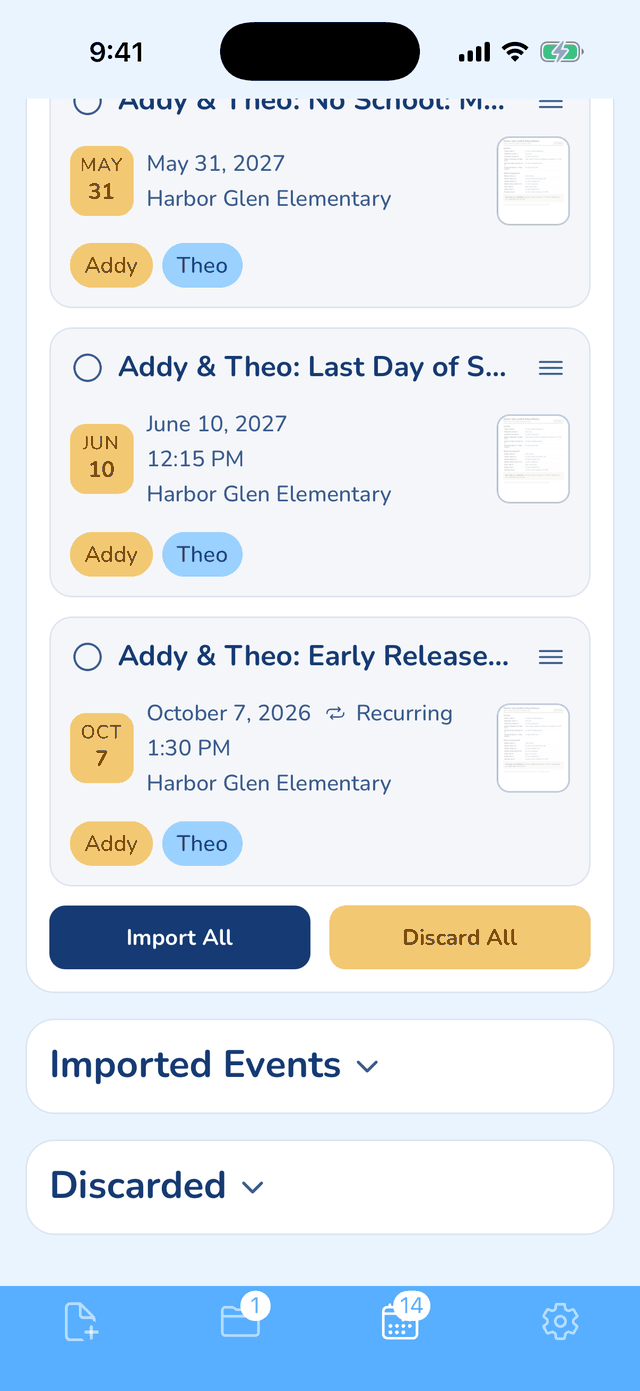
The play lands tagged to the right kid, in that kid's color, on the Google, iCloud or Outlook calendar your family already shares, or on several at once. Each person can have their own default calendars, so an event for two kids goes to both. Snap the district calendar the same way and the whole year goes in; Smart Extract keeps only your family's events.

Each event's notes link back to the scanned notice, one tap from the calendar. So the notice can go: scan it for peace of mind, then toss it.

The notice is filed under the right kid, grade and type as it arrives, so nobody sorts anything, even with two kids and a new notice every week.

Good

Every date off the paper with no typing, linked to the filed paper, on your Google, iCloud or Outlook calendar.

KidsFoldr's Events tab after a district school-year calendar was snapped, with dates months ahead, each tagged to a kid in that kid's color, above Import All and Discard All buttons.
A district calendar in KidsFoldr: dates months out, each tagged to a kid.

Which one fits your family

Pick by how your dates arrive.

What we left out, and why

Other family apps (FamilyWall, Nori, Sense)

They belong in a full ranking. Ours is the best family calendar app 2026 guide.

Maple

It's closing down, so it isn't an option (Maple).

FAQ

What is Cozi Free's 30-day limit?

On Cozi Free, you can only add events for the next 30 days, and only from the Agenda view (Cozi). Gold removes the limit and lets you add events from other views too, such as Month and 3-Day (Cozi).

Is there a free Cozi alternative without the 30-day limit?

Yes. Google Calendar, Apple Calendar with iCloud, Outlook.com and TimeTree cost $0 and list no 30-day window like Cozi's. Cozi's read-only Cozi URL feed can bring your events along into Google, Apple or Outlook.

Can I move my Cozi calendar to Google Calendar?

Yes, as a read-only subscription. In Cozi, go to Settings, then Shared Cozi Calendars, and copy the Cozi URL; in Google Calendar on a computer, add it under Other calendars, From URL (Cozi, Google). Cozi doesn't say which plans include it, and it documents no file export (Cozi).

Can a free calendar read a school flyer?

Some can, with limits. Gemini puts the event on your default Google calendar unless you name another, and free use refreshes every five hours, up to a weekly limit (Google). TimeTree's Event Scan can pull several events from one flyer image for you to review, though TimeTree doesn't say whether it's free (TimeTree).

Is Cozi Gold worth $39 a year?

Yes, if your family uses Cozi's lists and recipes and you don't mind typing dates. Gold also drops the ads on Cozi Free and adds month view on your phone (Cozi). If you cancel, Gold runs to the end of the term you paid for, then you're back on Free with your data intact (Cozi). Our Cozi review goes through Gold and Max in detail.

Sources