KidsFoldr
Comparison, 2026

Cozi vs Google Calendar for families

Which one puts the school-year calendar and this week's flyer in front of every adult in the house? Google Calendar for one free shared calendar, Cozi for lists in the same app, or KidsFoldr, which does both.

KidsFoldr is one of the apps here, and we make it. We take no affiliate commission.

Our picks at a glance

In Cozi vs Google Calendar for families, Google Calendar gives you a free calendar every adult can edit. Cozi Gold gives you one app with a color per person, lists and change alerts, at $39 a year. KidsFoldr does both: a color per person, up to 6 on one account, lists and sharing, on any calendar your family already shares, and it stores every paper, not just the ones with dates.

The one axis

How does the school paper reach every adult in the house?

Picture the school-year calendar page from the first-week packet and the picture-day flyer. The question has two halves: who can see and edit, and how the dates get in (typing, AI reading a photo or PDF, or the district's feed). A calendar only one parent can read is a to-do list.

The full comparison

Three apps on one axis, side by side. Scroll sideways on a phone. The app name stays put.

App How does the school paper reach every adult in the house? Who can see and edit How a paper gets in Where the dates live Price
KidsFoldr Well: every date on a whole page, with repeats and the kid each is for, on the calendars you already share Account shared with up to 6, a color each; share any folder, event or calendar Snap it, share a PDF or screenshot, or forward the email; repeats and kids included Any calendar on the phone, or several; publishes to shared calendars $3 a month. 14-day free trial, no card.
Google Calendar Well, once every adult has a Google Account Family calendar: up to 6, all edit; or share by invite Type it, or ask Gemini to read a flyer photo Google Calendar; add the district feed by URL, from a computer Free
Cozi Well on Cozi Gold; Cozi Free shows only the next 30 days One family account, up to 12, all edit, a color each Type it (SmartAdd on Cozi Gold), or forward a flyer photo or PDF (Cozi Max) Cozi's own calendar; add the district feed from a URL Free with ads; Cozi Gold $39 a year; Cozi Max $79.99 a year

How we picked

We ran hands-on tests of Cozi, Google Calendar and KidsFoldr, and checked each company's own pages: Cozi's plans, FAQ, blog and store listings, and Google's Calendar, Families and Gemini help. KidsFoldr facts come from our own product.

We checked who can see and edit, and three routes for a paper's dates: typing, AI from a photo or PDF, and a district feed. Where a vendor page is silent, we say so.

What we found: KidsFoldr turns a whole page into every date on it, with repeats and the kid each event is for, onto calendars the family already uses. It also combines family organizing (a color per person, up to 6 on one account, lists and sharing) with reach to any calendar on the phone.

Cozi's pages describe one flyer or email at a time. Google's Gemini help shows several events added from typed or pasted details. They do not describe turning a whole page into dates, with repeats and the kid each event is for. Each also needs every adult who edits inside its own account.

Between those two, Google Calendar is free for every adult to edit. Cozi Free shows only the next 30 days, and Cozi Gold costs $39 a year.

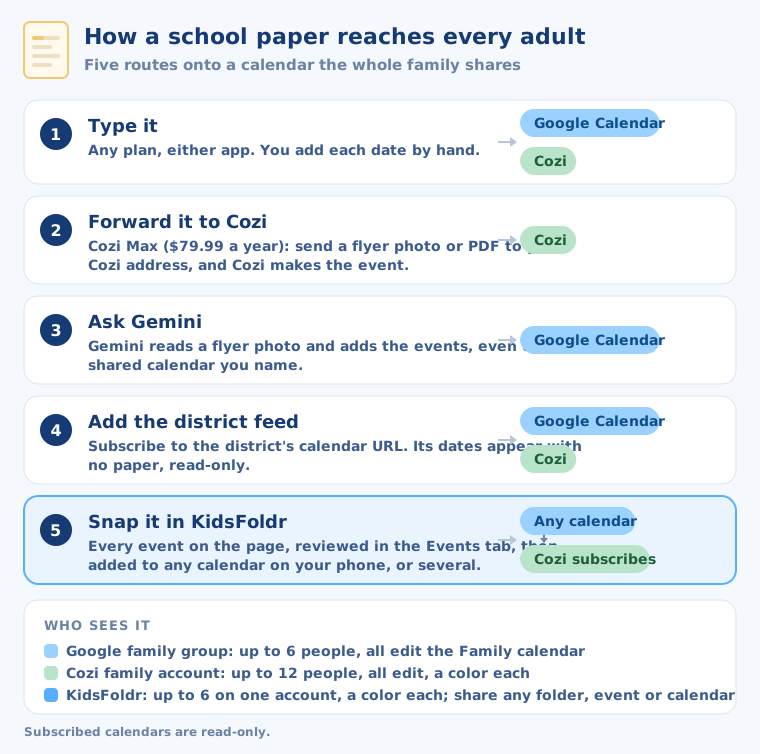
Five routes from a school paper to a calendar the whole family shares. 1, type it: any plan, either app, into Google Calendar or Cozi. 2, forward it to Cozi: on Cozi Max, a flyer photo or PDF sent to your Cozi address becomes a Cozi event. 3, ask Gemini: it reads a flyer photo and adds events to Google Calendar. 4, add the district feed: the district's calendar URL, read-only, in Google Calendar or Cozi. 5, snap it in KidsFoldr: every event on the page, reviewed in the Events tab, goes to any calendar on your phone, or several; Cozi can subscribe to a Google one. A Google family group holds up to 6 people who all edit; a Cozi family account holds up to 12; KidsFoldr is shared by up to 6 people on one account, a color each, and any folder, event or calendar can be shared.
Five routes in all: four on Cozi and Google, plus KidsFoldr.
3 appscompared, on 3 Cozi plans
3 routesfor a paper, checked on Cozi and Google
$0affiliate income

Every app, side by side

Here are the three apps side by side, each answering the same question. KidsFoldr turns a whole page into every date on it, with repeats and the kid each event is for, onto the calendars every adult already uses, and pairs that with family organizing. Google Calendar is free, and every adult with a Google Account edits one Family calendar. Cozi keeps the calendar, lists and recipes in one app.

KidsFoldr

Calendar, lists and paper storage
$3 a month. 14-day free trial, no card.
How does the school paper reach every adult in the house?

Well. It reads every date on the paper and puts them on the calendars your family already shares.

Scan any paper, and KidsFoldr files it with no effort (right kid, grade and type), searchable by any word on it. Then the paper can go, without guilt.

Its AI event import works like Cozi Max and Gemini together. Snap a photo, share a PDF, a screenshot or a file, or forward the school email with its attachments. A whole page of dates comes out with repeats and the kid each event is for. Smart Extract keeps only your family's events, and Duplicate Protection asks before adding one twice.

Like Cozi, it organizes the family. Each person gets a color, and up to 6 members share one account. It pulls the lists off a paper too: a supply list becomes a checklist for Apple Reminders or Google Tasks, with Find links to buy each item.

Every paper is stored, filed by kid and grade, including the ones with no dates at all: report cards, artwork, notices. Any folder or event can be shared.

Like Google Calendar, it reaches wide. Events go to any calendar on the phone (iCloud, Google, Outlook) or several at once, with default calendars for each member. It publishes to any shared calendar, so every adult sees the dates in their own calendar app.

Good

One snap of the school-year calendar page brings in every date on it, each for the right kid. Every calendar entry links back to its paper.
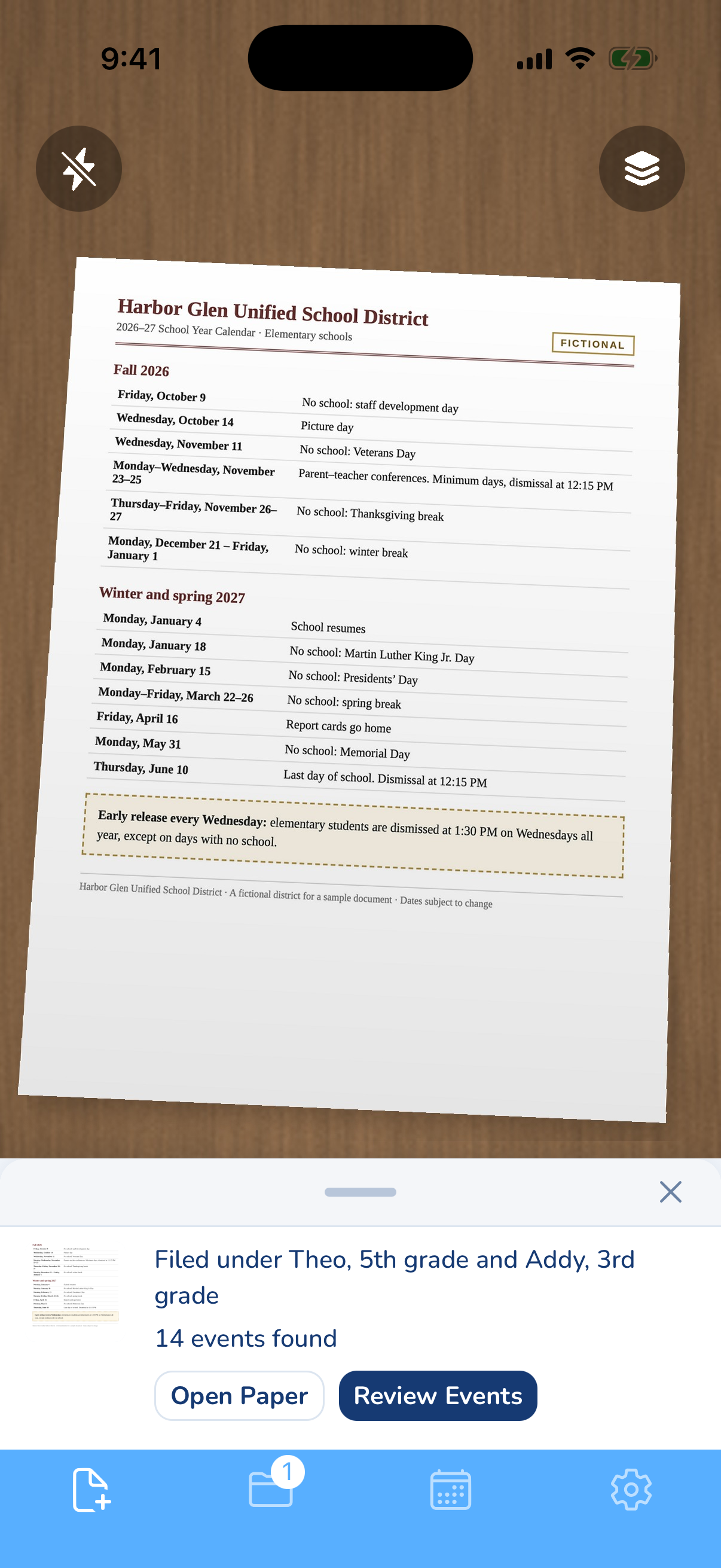
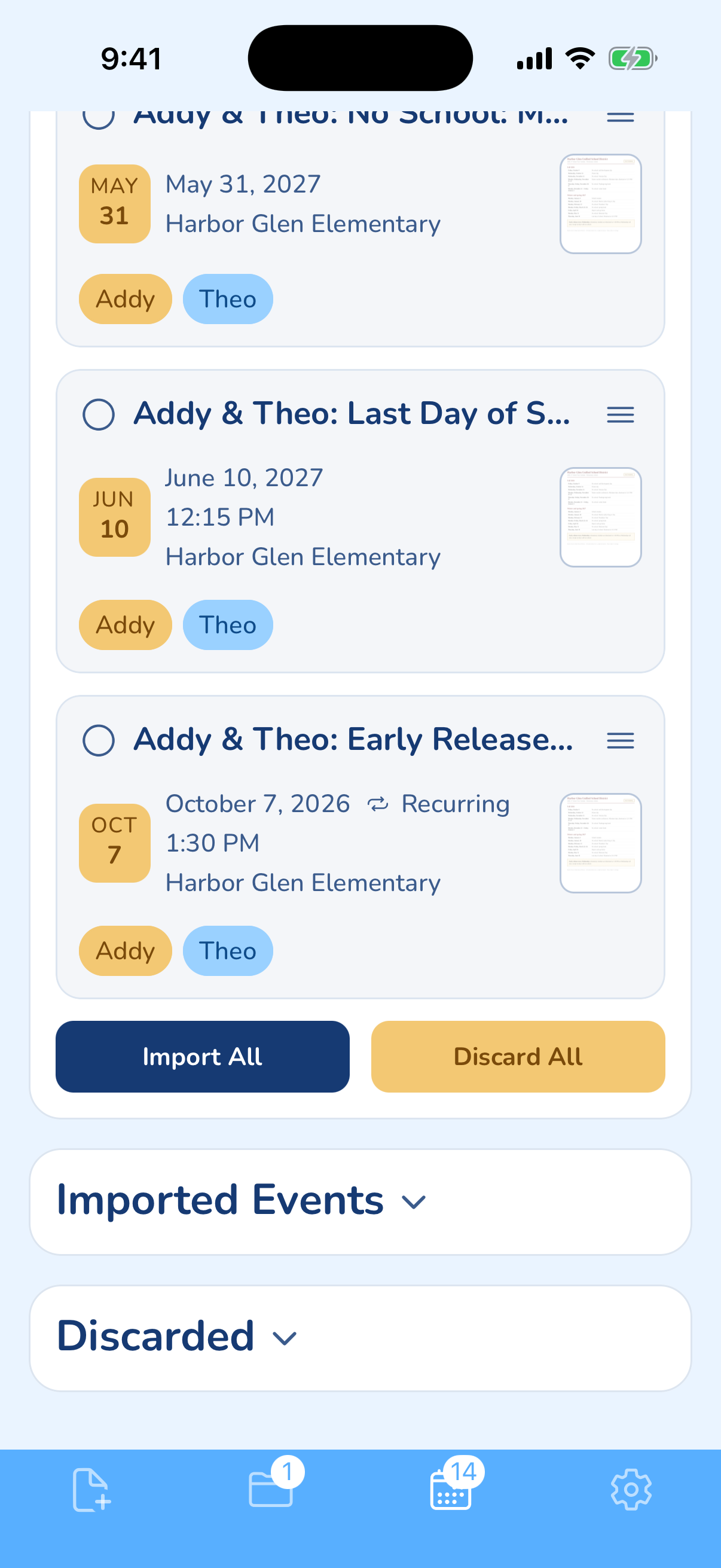
The KidsFoldr camera with the fictional Harbor Glen Unified 2026-27 school-year calendar in the viewfinder: no-school days, picture day, conferences, the last day of school and early release every Wednesday. The receipt below it reads "Filed under Theo, 5th grade and Addy, 3rd grade" and "14 events found," with Open Paper and Review Events buttons. The KidsFoldr Events tab before import, with events from the same calendar, each tagged Addy and Theo at Harbor Glen Elementary: No School on May 31, 2027, Last Day of School on June 10, 2027 at 12:15 PM, and Early Release from October 7, 2026 at 1:30 PM, marked Recurring. Import All and Discard All buttons sit below.
One school-year calendar page: filed under both kids, 14 events found, and Wednesday early release as one repeating event. Addy and Theo are fictional.

Google Calendar

Free shared calendar
Free
How does the school paper reach every adult in the house?

Well, once every adult has a Google Account. Everyone in the family group can edit the Family calendar.

A Google family group holds up to 6 people: a manager plus 5. Each member needs a personal Google Account; kids under 13 join through a supervised Family Link account.

Type the dates in, or ask Gemini: it can read a flyer photo and add events, even to a shared calendar you name.

Good

It is free on iPhone. Add the district's calendar feed by URL from a computer, and every date appears with no typing.

Bad

Pick "Family" in the Calendars menu, or the event lands on your own calendar. By default, nobody is alerted when someone changes a Family event. Gemini cannot add people to events, and Google warns it can get things wrong.

Cozi

Calendar with lists and recipes
Free with ads; Cozi Gold $39 a year; Cozi Max $79.99 a year
How does the school paper reach every adult in the house?

Well on Cozi Gold. One family account, everyone edits, and each person has a color.

Cozi holds up to 12 people, each signing in with their own email.

Type the dates in, or use SmartAdd on Cozi Gold, one line per event. On Cozi Max, copy your Cozi address in the mobile app. Then forward an email, a PDF or a flyer photo to it from your email, and Cozi makes the event. Any plan can add the district's feed.

Good

One family view, with shopping lists, to-dos and recipes in the same app. Is Cozi Gold worth it in 2026? Yes, at $39 a year, for a family that runs its week from Cozi. Canceling keeps your data.

Bad

The Cozi Free 30-day limit: you add, edit or view events only for the next 30 days, so June's field day is out of reach in September. Free shows ads, and the Cozi Gold trial is on the web only.

Setting it up for two adults

Each adult who edits needs a Google Account, or an email in Cozi's shared account.

Share Google Calendar with a spouse who uses iPhone

To share Google Calendar with a spouse who uses iPhone, add them to your family group. They see the Family calendar in Google Calendar or Apple's Calendar app.

  1. Invite your spouse to your family group.
  2. Or share one calendar by invite with a "Make changes" permission, from a computer or the Google Calendar app on iPhone.
  3. For Apple's Calendar app: iPhone Settings, Calendar, Accounts, Add Account, Google, sign in.

Without a Google Account, a spouse can only view, through a public calendar or its secret address.

Add the family to Cozi

Cozi uses one family account and one password. Add each person with their own email.

Reminders reach them by that email, or in the app with notifications on.

Use both: Google into Cozi, Cozi into Google

Both directions work, and both are read-only.

  1. Google into Cozi: on the web, copy the Google calendar's "Secret address in iCal format".
  2. In Cozi, Settings, Connected Calendars, add it from a URL and pick the family member. Cozi checks about once an hour.
  3. Cozi into Google: copy the URL from Cozi's Settings, Shared Cozi Calendars. In Google Calendar on the web, add it under Other calendars, From URL. Allow a day or two.

That first route also carries KidsFoldr's events into Cozi.

What we left out, and why

The wider field is compared in the best family calendar app in 2026.

Skylight

A wall screen is a different purchase.

Apple Calendar, TimeTree and other shared calendars

Covered in the wider roundup.

Other chatbots reading flyers

Gemini is here because it writes to Google Calendar.