
- Pools usually post a few days before, often midweek, and can change until the day. When the pool sheet lands, put check-in, every pool match and every work slot on the calendar.
- Block the rest of the day as "Bracket TBD." Bracket times do not exist until pool play ends, so add them on the day.
- The host's live page is the source of truth. Your calendar, or a club volleyball tournament schedule app that reads the sheet, holds the plan and shares it.
The paper is the pool sheet. It is a PDF, or a screenshot of the host's pool page, that the club sends before the event. It lists your pool, courts, match times, work slots and check-in.
Many hosts build it in SportsEngine AES, which can export a Pool Sheet, a Bracket Sheet and a Schedule. The catch: a calendar entry made Wednesday is partly wrong by Saturday noon.
The three schedules you get, and when
A tournament weekend arrives in three pieces, on three timelines.
| Piece | When it arrives | What goes on the calendar |
|---|---|---|
| Your pool | A few days before, often midweek | Hold the whole day |
| The pool sheet | With the pool; can change until the day | Check-in, each match, each work slot |
| Your bracket matches | After pool play ends | "Bracket TBD," then the posted times |
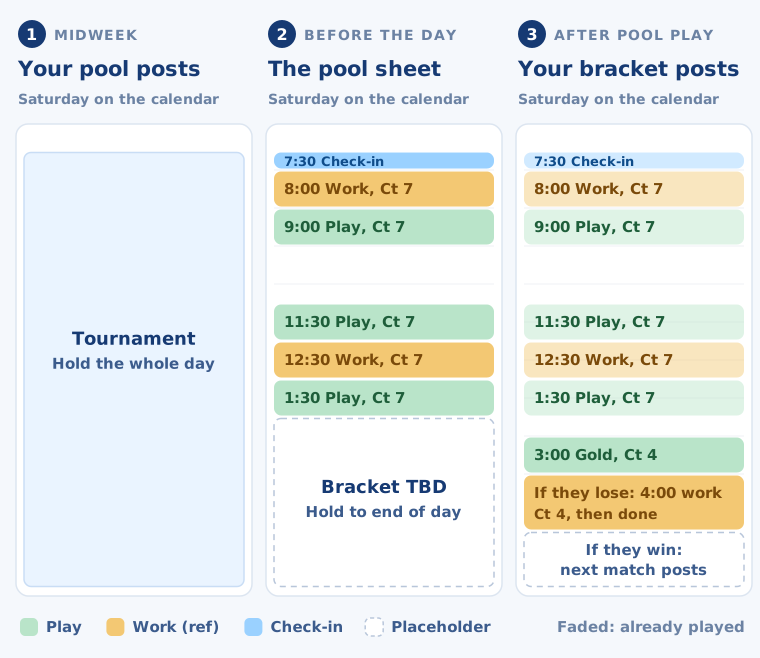
Timing varies by event. One North Texas club's region posts pools on Tuesday of event week, and they can change until Friday.
Some events post the empty bracket shape by Thursday. Two-day events often run pools on day one and brackets on day two.
Not every event has a bracket. Some lower divisions play pools only.
How to read a pool sheet
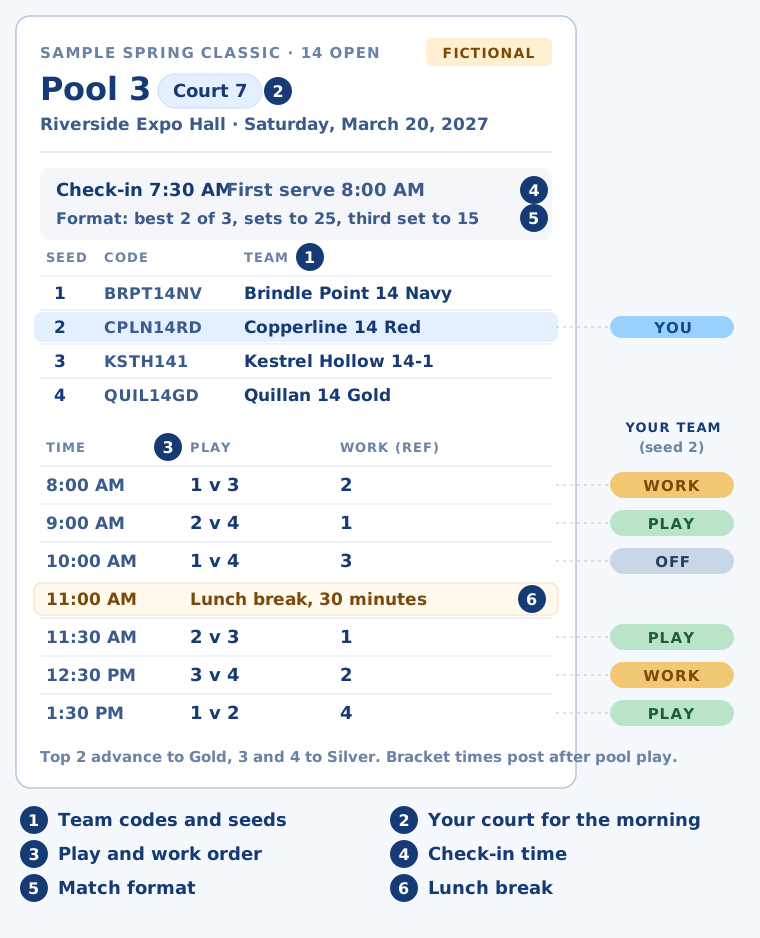
Find your team's code, your court, the match order, and the rows where your team works. Each round, your team plays, works or sits.
Play, work, off
Pools are small round-robins, commonly three to five teams. In a four-team pool, seed 1 might play seed 3 while seed 2 refs, then 2 plays 4 while 1 refs. Your seed tells you which rows are yours.
Work means officiating another match in your pool. Your players keep score, run the scoreboard, judge lines and serve as second referee. Teams can be penalized for missing it.
Match format and length
Matches are often best two of three, with sets to 25 and a third set to 15. Two-set pools and other formats exist, so read the format line. Schedules often assume about an hour a match, but the times are a guide.
Confused by the pool sheet? Try this
A pool sheet names teams by seed or code, and you match them to rows by hand. KidsFoldr can do the matching for you.
Add your kid's name and team to their profile in Family Profiles. Then snap the pool sheet. Smart Extract keeps only that team's matches and work slots, even when the sheet labels teams through a key of seed numbers or team codes. Other teams' rows are set aside.
Try it on our fictional sample pool sheet (image). Enter a kid on Copperline 14 Red. Save the image, then share it to KidsFoldr. Copperline is seed 2, so look for three matches (9:00, 11:30 and 1:30) and two work slots (8:00 and 12:30).
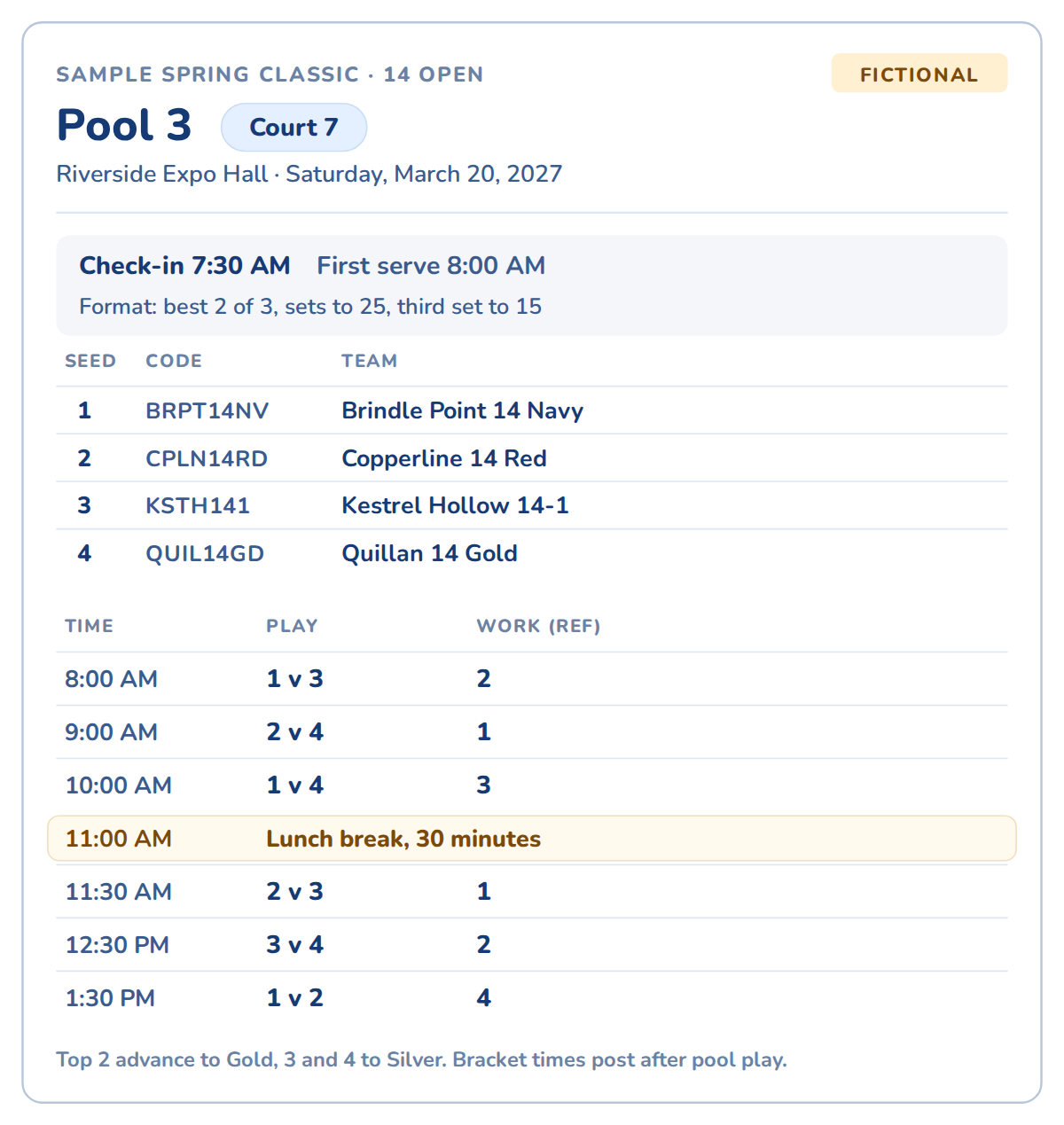
Compare what comes back with the sheet above. Your kid's day is on the Events tab, ready to send to the calendar.
What goes on the calendar, and what does not
Put check-in, every pool match and every work slot on the calendar. Your kid is on the court for all of them. Leave bracket matches off until they post.
Check-in is the club's call. One club wants players in the gym an hour before a first match and 30 minutes before a first work slot.
Plan on all day. An empty schedule after pools does not mean you are done: tiebreakers or a second pool can follow.
If you keep track of multiple kids' activities, put a sibling's Saturday game on the same calendar under that kid's name. You see the clash on Wednesday, not at 7 a.m. Saturday.
How to add a volleyball schedule to Google Calendar
Google Calendar imports .ics and .csv files, not PDFs or photos. So a pool sheet gets typed in or run through a tool that reads it. Imported events are one-time copies and do not update.
The other way to add a sports team schedule to Google Calendar is to subscribe by URL. That works only in a computer browser, and only for public calendars. SportsEngine's app can subscribe a SportsEngine team schedule, but not tournament pools.
Friday night
-
1
Check the version.
Pools can change until the day, so match the sheet to the club's latest post.
-
2
Add every slot.
Check-in, each match and each work slot, with the court number in the title.
-
3
Add the address.
Put the venue's street address on each entry. Add Addresses fills it in from the gym's name.
-
4
Hold the afternoon.
Block the rest of the day as "Bracket TBD."
-
5
Share it.
Send the entries to the other parent or whoever is driving.
On the day
-
1
Check the host's page.
Look for changes before you leave.
-
2
Find your bracket.
After pool play, look up your first bracket match.
-
3
Replace the placeholder.
Swap "Bracket TBD" for the posted time and court.
-
4
Fix only what moved.
Change pool entries only if the schedule changed.
-
5
Close the day.
After a bracket loss, your team usually refs the next match on its court, then is done. End the calendar block there.
Which club volleyball tournament schedule app does what
Host platforms and parent apps run the live day. KidsFoldr holds the plan.
What the host platforms and apps do better
| Tool | What it is | What it does best | Live scores and brackets |
|---|---|---|---|
| SportsEngine AES | Scheduling software many hosts use | Builds pools, brackets and playoffs; team schedules under "Schedules & Results" | Yes; results post on an interval the director sets |
| OTTO EVENT (formerly SportWrench) | Tournament software built mainly for volleyball | Court assignments, bracket progression, lookup by team, court or time | Yes, real-time scores |
| Volleyball Hub | Parent app for iPhone and Android | Pulls AES and SportWrench events into one app; your team's next play and work time on the home screen | Yes |
Volleyball Hub is free with in-app purchases. It rates 4.8 stars from 5.9K App Store ratings and 4.7 on Google Play, where it shows ads.
Where KidsFoldr fits
KidsFoldr takes the pool sheet three ways: snap it, share the PDF, or pick a screenshot saved to Photos. Event extraction puts each event, with date, time and place, in the Events tab. Review them, and add anything the sheet implies but does not list. If a row is missing, Check for events reads the filed sheet again.
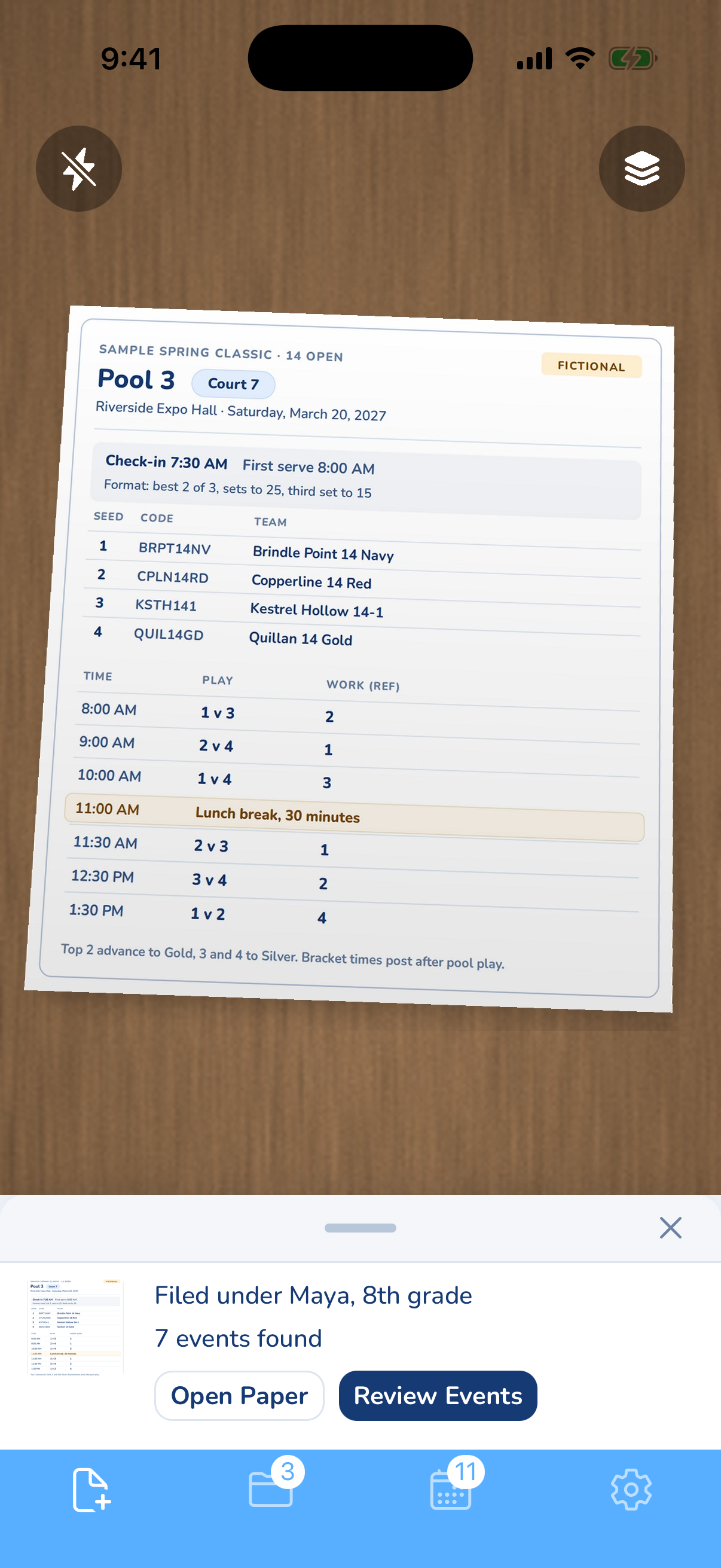
One tap sends them to one or several of your phone's calendars, including iCloud, Google, Exchange and shared family calendars, with a default calendar for each kid. Each calendar entry links back to the pool sheet. The sheet is filed under your kid, and full paper text search on the Papers tab finds it by team code or gym name.
When an updated sheet arrives, snap it again. Duplicate Protection asks once for the batch what to do with events already on your calendar: import anyway, replace, or skip.
Smart Extract keeps only your kid's team's matches and work slots. Snap the updated sheet at lunch, and it also sets aside matches already over.
Away tournaments mean gyms you have never driven to. Add Addresses turns a venue name on the sheet into a street address on the event card and the calendar entry, so the address is on the event before you leave home.
Share an event, and the driver gets a free link with a calendar file to add, plus the pool sheet photo if you choose. Share your kid's folder, and the other parent sees each new sheet as it is filed.
Common questions
What are gold and silver brackets?
Pool results sort teams into brackets of similar ability. Top finishers go to Gold, the next to Silver, then Bronze, and bigger events add more. Bracket play is usually single elimination, sometimes double.
How long does a club volleyball tournament day last?
A one-day event often runs about 8 a.m. to 5 p.m. Big events run morning and afternoon waves of about six hours, and bracket play can run into the evening.
How do I add a volleyball schedule to Google Calendar from my phone?
Type it in, or use an app that reads the pool sheet and sends the events to the Google account on your phone. The Google Calendar phone app cannot import a file or subscribe by URL. Google says to do both on a computer.