The best family calendar app in 2026, ranked by what it does with a school calendar page
We ranked the best family calendar apps of 2026 on one paper: the district's year-at-a-glance calendar. KidsFoldr ranks first, because it reads the page, writes the repeats and tags each kid. Nine apps, ranked on their own documentation.
K
KidsFoldrThe KidsFoldr team
Updated Prices checked
KidsFoldr is one of the apps ranked here, and we make it. We take no affiliate commission from any product on this list. The table decides the order.
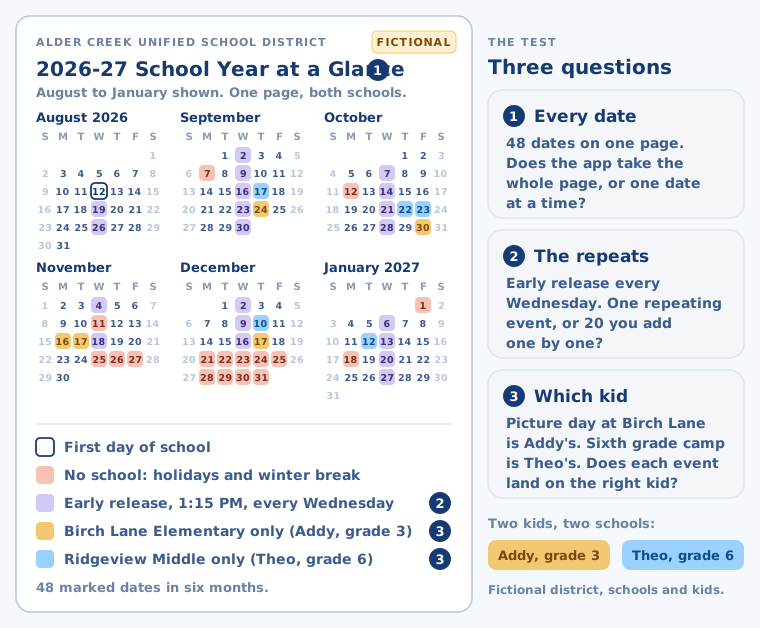
The fall festival flyer no longer separates these apps. Gemini reads a flyer photo if you ask, and eight of the nine apps below say they turn a flyer into calendar events. The district's year-at-a-glance calendar splits them: dozens of dates, days that repeat, and events for one kid but not the other. That last part is how you keep track of multiple kids' activities.
Best family calendar app 2026: the full comparison
Scroll sideways on a phone. The app name stays put.
App
What does it do with the school calendar page?
Repeats and which kid
Shared family view
iPhone / Android
Price
KidsFoldr
Reads every date, repeats and kids documented
Repeating events; each kid tagged, to their own calendars
Any calendar you use; account shared with up to 6
Both
$3 a month. 14-day free trial, no card.
Calendara
Reads every date, repeats and kids documented
Repeats on the review screen; you tag who it's for
Yes, colored by person
iPhone only
$39.99/yr; 7-day preview
Sense
Reads a full page; repeats or kids not stated
Files under the right kid; repeats not stated
Yes
Both, plus web
Free tier; Premium $59.99/yr
KidCal
Reads a full page; repeats or kids not stated
Repeating events; which kid not stated
Fills Google or Apple Calendar
See kidcal.app
$50 per kid a year; 14-day trial
Nori
Reads a full page; repeats or kids not stated
Neither stated
Yes
iPhone; Android on Google Play
Free; Nori Plus $59.99/yr
Skylight
Reads a full page; repeats or kids not stated
Neither stated
Yes, on the wall
Both (companion app)
From $169.99; Calendar Plus $79/yr
Hearth
Reads a full page; repeats or kids not stated
Neither stated
Yes, on the wall
iPhone; no Android app found
$629.10 on sale; required membership $86.40/yr
Cozi
A flyer photo or PDF, emailed to Cozi Max
Neither stated
Yes, one family view
Both, plus web
Free; Gold $39/yr; Cozi Max $79.99/yr
Google Calendar with Gemini
One flyer, if you ask Gemini
Neither stated
Yes, shared calendars
Both
Free
How we picked
We ran hands-on tests and checked each app's documented features: vendor pages, help centers and store listings. KidsFoldr facts come from our own product.
We asked three questions of each app. Does it read a page of many dates? Does it handle days that repeat? Does it know which kid each event is for?
The test, on a fictional district calendar.
Five are AI calendar apps for parents that read a whole page on your phone: KidsFoldr, Calendara, Sense, KidCal and Nori.
Axis tier comes first. Inside a tier, more answers documented ranks higher, then automatic kid tagging, then platforms, then price.
9 appsranked
8 moreleft out
3 questionsasked of each
$0affiliate income
Every app, ranked
1
KidsFoldr
Best for a whole school calendar page
$3 a month. 14-day free trial, no card.
What does it do with the school calendar page?
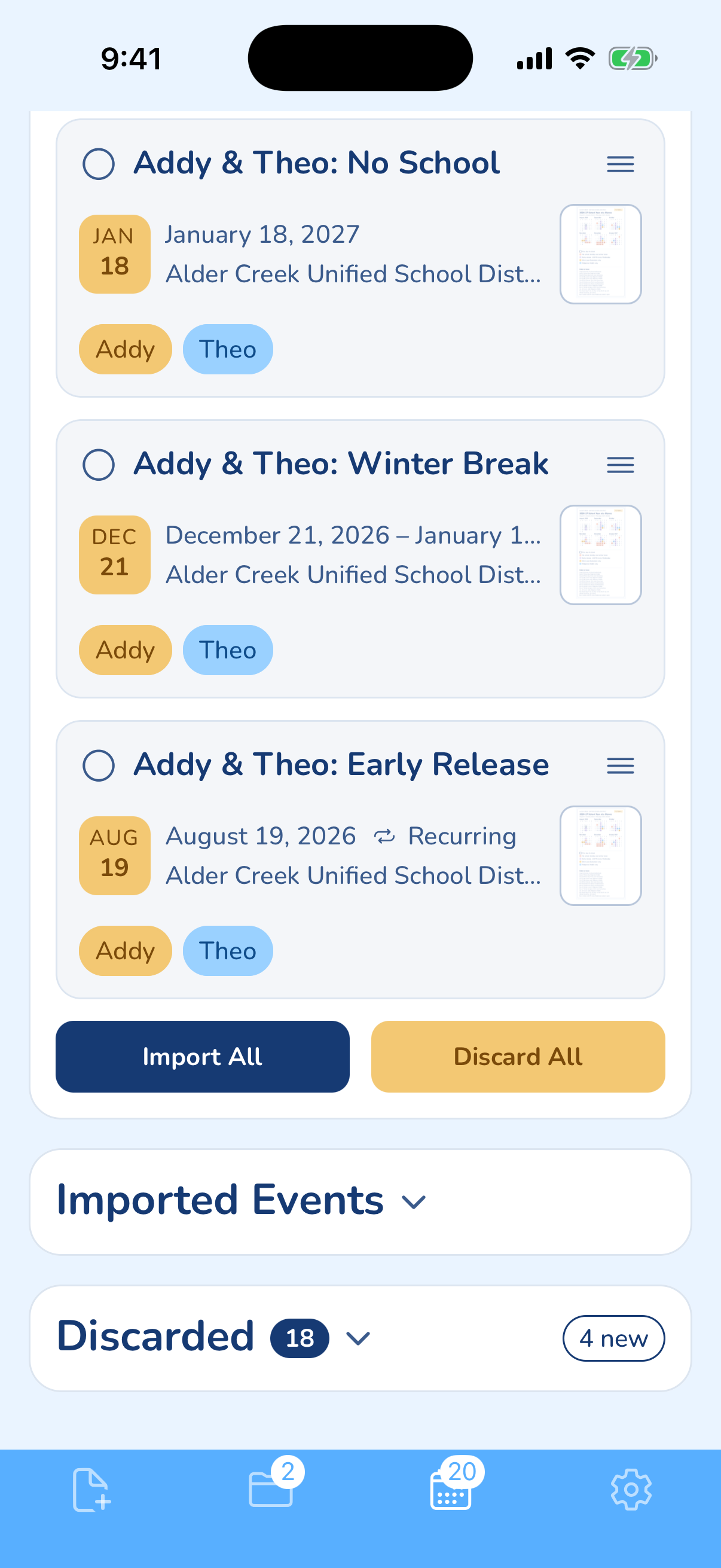
Every date on the page goes to the Events tab to review, with time, place, repeats and the kids it belongs to.
KidsFoldr reads the paper and fills the calendar you already share. Every event goes into the calendars on your phone: Apple, and any Google or Outlook account you've added to it. Event Label Format puts the kid's name in each title, as in "Maya: Picture Day."
Snap the district calendar, share the PDF, or forward the school's email. Smart Extract keeps your family's events and sets aside dates already past. Each kid's events land in that kid's calendars. When the district revises the page, snap it again: Duplicate Protection asks before adding a date already there.
In KidsFoldr, every paper is filed under the right kid and searchable by any word on it, so the paper can go. Add Addresses turns the team schedule sheet's venue names into street addresses. A supply list or sign-up sheet becomes a list you can send to Reminders or Google Tasks. Every calendar entry links back to its paper.
Good
Kids tagged automatically, each in their own color, and repeating days written as repeating events. Events go to any calendar on your phone, or several. Share the account with up to 6 people, or share a folder, an event or a calendar. A shared event is free for the person you send it to.
Bad
Want the calendar on a screen on the kitchen wall? Pair it with Skylight.
One district calendar page, by kid: Wednesday early release comes in as one repeating event. Addy and Theo are fictional.
2
Calendara
$4.99 a month or $39.99 a year, after a 7-day preview
What does it do with the school calendar page?
It reads photos of school calendars, plus screenshots and PDFs, shows repeats on its review screen, and lets you tag who each event is for.
Calendara is a family calendar, colored by person, with two-way Google and Apple Calendar sync. Its Sept. 6 update added PDF import for flyers, newsletters and camp schedules.
Good
The closest documented match to this page.
Bad
iPhone only, with nine App Store ratings. You fill in the kid tag yourself.
3
Sense
Free tier; Premium $6.99 a month or $59.99 a year
What does it do with the school calendar page?
It reads photos, PDFs and forwarded email, and says it files events under the right kid. Its release notes mention school calendars; repeats are not stated.
Sense is a family organizer with lists and chores. One Premium price covers the whole family.
Good
A free tier that never expires, with 10 AI actions a month, on iPhone, Android and the web.
Bad
Past 10 AI actions a month, capture takes Premium. The kid filing claim is marketing copy, not a help article.
4
KidCal
$5 per kid a month or $50 per kid a year; 14-day trial
What does it do with the school calendar page?
It reads photos of school calendars and sports seasons, supports repeating events, and lets you accept or reject each one. Which kid is not stated.
Events go into your Google or Apple Calendar, and its pricing list names Outlook too. It also watches email for events.
Good
Built for exactly this paper.
Bad
Priced per kid: three kids cost $150 a year. Three App Store apps share the name, so start from kidcal.app.
5
Nori
Free core; Nori Plus $7.99 a month or $59.99 a year
What does it do with the school calendar page?
Photograph a flyer, permission slip or poster, or forward a semester schedule or PDF. Repeats and which kid are not stated.
Nori is a free family calendar with chores, lists and recipes, and no ads. It syncs Google, Apple and Outlook calendars.
Good
4.8 stars from 1.5K App Store ratings, and a real free calendar.
Bad
You get 10 AI actions to try, then Nori Plus. The App Store says iPhone only, though a Google Play listing exists.
6
Skylight
Best wall display
10" $169.99, 15" $299.99, Max 27" $599.99; Calendar Plus $79 a year or $7.99 a month
What does it do with the school calendar page?
Magic Import, on Calendar Plus, turns paper schedules, PDFs, email and flyer photos into events. Since Aug. 28, 2026, you can review what it found. Repeats and kids are not stated.
Skylight is a screen on the kitchen wall. Its free features sync Google, Apple, Outlook and Cozi calendars and run chores and lists.
Good
A calendar the kids can read from across the room.
Bad
Magic Import needs Calendar Plus on top of the display.
7
Hearth
Display $629.10 on sale ($699 list); Family Membership $9 a month or $86.40 a year, required
What does it do with the school calendar page?
Send a photo of a paper calendar to Hearth Helper, which adds it after you approve. Repeats and kids are not stated.
Hearth Display is a screen for the wall. It subscribes to school district and TeamSnap calendar links, onto each kid's calendar.
Good
An approval step before anything lands, and a 120-day home trial.
Bad
Setup requires the membership, after a free first month. We found no Android app.
8
Cozi
Best shared family calendar
Free with ads; Gold $39 a year; Cozi Max $79.99 a year
What does it do with the school calendar page?
Cozi Max reads a PDF or flyer photo you email to your Cozi address. Many dates, repeats and kids are not stated.
Cozi is one family account, color-coded by person, with shopping lists and recipes.
Good
One family view and real lists. It also takes the district's calendar link.
Bad
Cozi Free adds, edits and shows events only 30 days ahead. Anything further out takes Gold.
9
Google Calendar with Gemini
Best free
Free
What does it do with the school calendar page?
One flyer, if you ask. Photograph it and ask Gemini to make the event. A page of many dates is not documented.
Google Calendar shares with view, add or edit permissions. Gemini makes it a photo to calendar app, one flyer at a time.
Good
Free, everywhere, and the calendar that KidsFoldr, KidCal, Calendara and Nori write into.
Bad
Each paper takes its own prompt. Google says Gemini can make mistakes, and work or school accounts need an admin to turn it on.
What we left out, and why
Not ranked, for these reasons.
TimeTree
A strong free shared calendar that names no way to read paper, so you type every date.
FamilyWall
A free shared calendar with lists. It names no photo or AI entry.
Apple Calendar with Visual Intelligence
Point the camera at a flyer and tap Add to Calendar for one event. It needs an iPhone 15 Pro or later with Apple Intelligence.
Cozyla
A wall display, like Skylight and Hearth.
Honeydew and Ohai
AI household apps, for a later comparison.
Gether
Its site returned an error when we checked.
Outlook
A work calendar first. Several apps above write into it.