How it scored
On Free and Gold, you type each date yourself (Gold's SmartAdd gets it down to one line). Cozi says Max reads a forwarded email, PDF or flyer photo, but it doesn't say what Max does with a page of many dates.
Up to 12 people, each with a color, a filter by person, and one subscription for everyone. A point off because everyone sees and edits everything.
The calendar, shopping lists, to-dos, recipes and a meal planner live in one app, with daily and weekly agenda emails. Month view on your phone and calendar search need Gold.
You keep the shared calendar, lists, recipes and calendar subscriptions, but you only see 30 days ahead, with ads.
Gold at $39 a year for the whole family removes the 30-day wall. Max roughly doubles that for AI features that work only in the mobile app, and Cozi doesn't document their limits.
At a glance
- Made by
- Cozi
- Plans
- Free, Gold, Max
- Price
- Free (with ads); Gold $39 a year; Max $79.99 a year ($79 on Cozi's compare page)
- Free calendar reach
- 30 days ahead
- Family size
- Up to 12 people, one subscription for all
- Reads a school flyer
- Max only: forward an email, PDF or flyer photo to your Cozi address (mobile app)
- Other calendars
- Subscribe to iCal feeds in, share a feed out; both read-only
- Photos or files on events
- Not supported; a link can go in Notes
Pros and cons
- One shared family calendar with a color for each person, for up to 12 people. Families like it: it's rated 4.8 on the App Store.
- Shopping lists, to-dos, recipes and a meal planner sit right beside the calendar, so the grocery list and the game schedule live in one place.
- One Gold subscription covers everyone on every device, and canceling drops you back to Free with your data intact.
- The school's or team's calendar feed can come in on any plan, read-only, refreshed about once an hour.
- Free only adds, edits and shows events in the next 30 days, and it carries ads.
- Cozi doesn't say what Max does with a page of many dates, a weekly practice, or which kid an event is for. The sender is the attendee until you change it.
- The AI features work only in the mobile app, not on the website.
- A Cozi event can't hold the flyer itself, because images and files can't be attached. The paper still needs a home.
How we tested
We ran hands-on tests and checked Cozi's documented features.
Setting it up
You set Cozi up once for the whole family. Each person who signs in needs their own email address, and everyone shares one family password (Cozi FAQ).
Then, in this order:
- Add each person and give them a color. Shared events show every name and color dot on them.
- If your school publishes a calendar feed, add it under Settings > Connected Calendars > Add a calendar from a URL, and pick who it's for.
- Choose how each adult gets reminders, by push or email. On Free, each person gets one reminder per event; Gold allows up to three.
- Turn on the weekly agenda email. It's the closest thing to the fridge calendar, delivered to everyone's inbox.
- On Max, your import address is in the Calendar tab under AI Event Import, next to your name.
Want to try Gold before you pay? Cozi's two-week trial only starts when you buy on the web, not in the app stores (Cozi FAQ).
The 30-day window is what you're really paying to remove.
What the plan costs
Is Cozi Gold worth it in 2026? For a family that plans past next month, yes: Gold is $39 a year and covers everyone in the account. Max is about $80 a year and adds three AI features on top of Gold (Cozi).
Cozi's own pages are a cent apart on Max: the compare page shows $79, while the Max page and the App Store show $79.99. Check the price at checkout. Both paid plans are billed yearly.
| Plan | Price | What it unlocks |
|---|---|---|
| Free | $0, with ads | Shared calendar 30 days ahead, shopping and to-do lists, recipe library, calendar subscriptions |
| Gold | $39 a year (two-week trial on the web only) | Everything in Free, plus no ads, unlimited future calendar, month view on mobile, calendar search, up to three reminders per event, change notifications, birthday tracker, Shopping Mode, SmartAdd, priority support |
| Max | $79.99 a year (Cozi's compare page shows $79) | Everything in Gold, plus AI Event Import, AI Recipe Creator and AI Meal Planner, in the mobile app |
The Cozi free 30-day limit, in plain terms
On Cozi Free, you can only add, edit and see events in the next 30 days, per Cozi's App Store and Google Play listings. Gold removes the limit.
The spring concert in March, or the summer camp deadline, can't go on the calendar until it's a month away. So the flyer sits on the fridge for weeks, and that's exactly when it gets buried.
Which plan fits your family
If you already use Cozi, Gold is the plan most worth paying for.
Stay on Free if your dates mostly live inside the month and you use Cozi mainly for shared lists. The ads are the trade, and that's a fair one for a lot of families.
Pay for Gold if you plan further ahead than four weeks, want the month view on your phone, or want a heads-up when someone changes an event. One payment covers the whole household.
Consider Max if school emails and PDFs are where your dates come from, and you don't mind opening each new event to set the right kid.
Look elsewhere if you need dates months ahead for free, or want a whole flyer read for you. Our Cozi vs Google Calendar comparison and the calendar picks below are good next stops.
What it does with the paper
Short version: on Free and Gold, you're the one reading the flyer and typing its dates. Gold just makes the typing quicker and lets you go past 30 days. Max is the plan that reads the flyer for you, as long as you send it in.
Picture the Friday folder: a picture day notice, the fall festival flyer, and a field trip sheet with a date and a permission-slip deadline. Behind them sits the district's year-at-a-glance calendar from the first-week packet.
On Free: type it, inside 30 days
You add each date by hand, and only for the next 30 days (Cozi FAQ). The fall festival goes in today. The March concert waits until February.
On Gold: type it faster, all year
SmartAdd turns one typed line (title, date, time, @names) into an event. Events default to one hour, and an event with no names tags everyone (Cozi).
Cozi's own SmartAdd post pitches it for typing in a PDF school calendar. Handy, but you're still the one reading the page and typing each line.
On Max: forward the flyer
Looking for a photo to calendar app? On Max, Cozi says you can forward an email, a PDF or a photo of a paper flyer to your family's import address, and that if it has a date on it, it will work (Cozi).
The event lands on the shared family calendar with you, the sender, as the attendee. Open each one to set who it's for, and check the date and time while you're there. All of this happens in the mobile app only.
What Cozi doesn't say: what happens to a flyer with several dates or a whole school-year page, whether a weekly practice comes in as a repeating event, or whether the event is matched to the right kid. If you'd like to see every date on a flyer before you decide, try the free flyer to calendar tool.
The district calendar: look for a feed first
If the district publishes a calendar link (an iCal feed), subscribe Cozi to it on any plan, and the year's dates come in on their own. The feed is read-only, and Cozi checks it about once an hour.
Cozi gives steps for Google, Apple and Outlook calendars and for school platforms like Schoology, Google Classroom and Canvas. Its own school-calendar how-to offers two routes: the feed, or typing the dates in. Cozi doesn't say whether Free shows feed events more than 30 days out.
If your district's calendar only comes as a PDF, the school calendar PDF converter turns it into calendar events.

Where the flyer goes afterward
Nowhere in Cozi. A Cozi event can't hold an image or a file, though a link can sit in its Notes (Cozi FAQ).
Cozi's own school-paperwork advice is to use a separate scanning app and save a PDF copy before recycling. So with Cozi, the paper is a second job: scan it in one app, keep its dates in another.
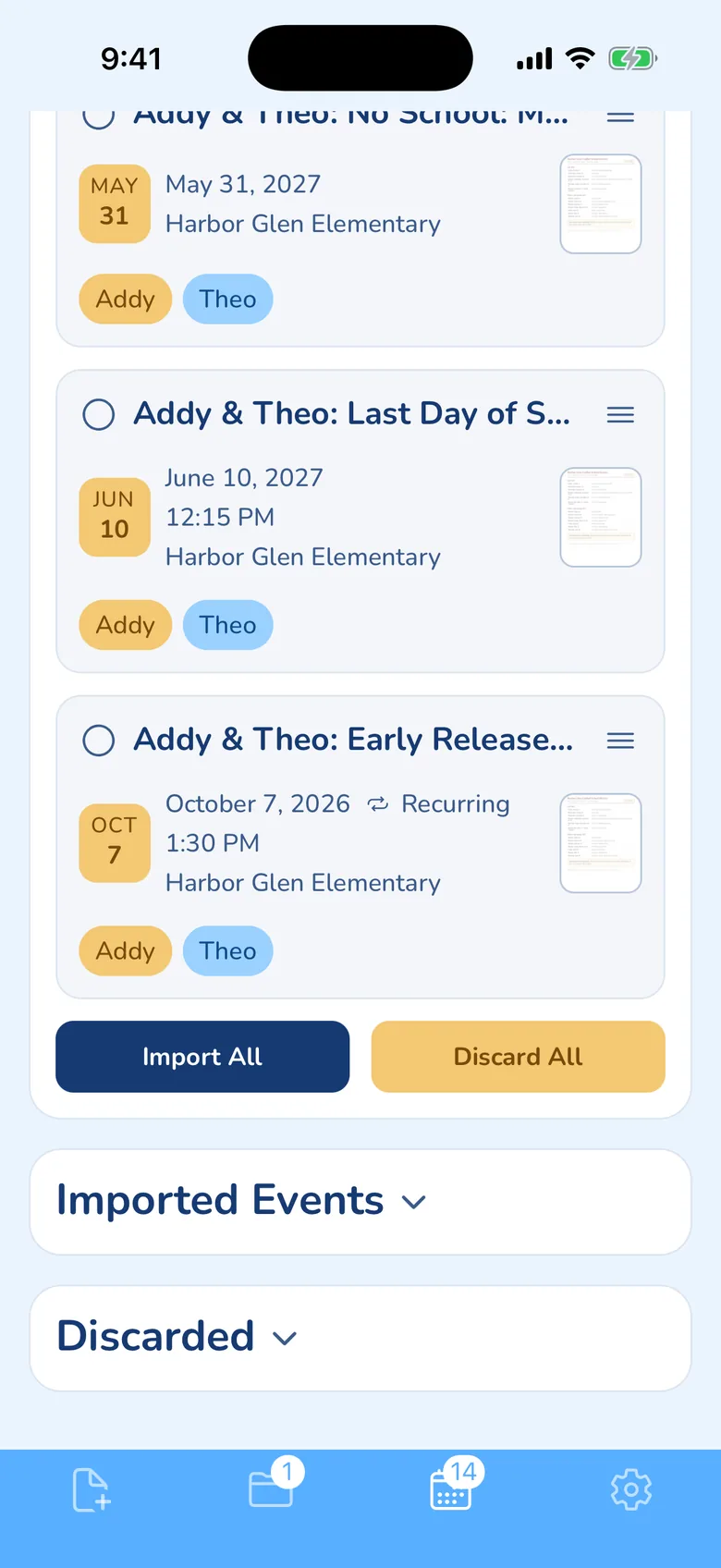
With KidsFoldr, you snap the flyer and every date on it lands on your family calendar with no typing, a weekly practice as one repeating event. Each event links back to its paper in the calendar entry's notes, so you scan the flyer for peace of mind, then toss it with no guilt. The flyer is filed under the right kid, grade and type as it arrives, so with two kids and a new flyer every day, nothing slips.
KidsFoldr puts events on whatever calendar you already use (iCloud, Google, Outlook, a shared family calendar, or several at once). A family that keeps Cozi can subscribe Cozi to that Google or iCloud calendar's feed, which Cozi checks about once an hour.
Screenshots
If not this, then
FAQ
Is Cozi still free?
Yes. Cozi Free keeps the shared calendar, lists and recipes, with ads, but it only reaches 30 days ahead.
What is the Cozi free 30-day limit?
On Free, you can only add, edit and see events in the next 30 days. Gold removes the limit, so dates months away can go on the calendar now.
Is Cozi Gold worth it in 2026?
Yes, for a family that uses Cozi every day and plans more than a month ahead. It's $39 a year for everyone in the account, with no ads and the full calendar.
Can Cozi read a school flyer?
On Max, Cozi says you can forward a photo of a flyer, a PDF or an email to your import address and it makes an event. Cozi doesn't say what happens to a flyer with many dates.
Can I add the school calendar to Cozi without typing it?
Yes, if the school publishes an iCal feed. You can subscribe on any plan; the feed is read-only and Cozi checks it about once an hour.
Is there a free trial of Cozi Gold or Max?
Gold has a two-week trial, started on Cozi's website rather than in the app stores. Cozi doesn't mention a trial for Max.
Read next in this cluster
Sources
- Cozi, Compare plans: https://www.cozi.com/compare-plans/ (checked Oct 14, 2026)
- Cozi, homepage: https://www.cozi.com/ (checked Oct 14, 2026)
- Cozi Gold: https://www.cozi.com/cozi-gold/ (checked Oct 14, 2026)
- Cozi Max: https://www.cozi.com/cozi-max/ (checked Oct 14, 2026)
- Cozi FAQ: https://www.cozi.com/faq/ (checked Oct 14, 2026)
- Cozi Calendar: https://www.cozi.com/calendar/ (checked Oct 14, 2026)
- Cozi, Using Cozi with other calendars: https://www.cozi.com/using-cozi-with-other-calendars/ (checked Oct 14, 2026)
- Cozi blog, Introducing Cozi Max: https://www.cozi.com/blog/introducing-cozi-max/ (checked Oct 14, 2026)
- Cozi blog, Why more families are upgrading to Cozi Max: https://www.cozi.com/blog/why-more-families-are-upgrading-to-cozi-max/ (checked Oct 14, 2026)
- Cozi blog, SmartAdd: https://www.cozi.com/blog/cozi-smart-add/ (checked Oct 14, 2026)
- Cozi blog, How to add a school calendar to Cozi: https://www.cozi.com/blog/how-to-add-a-school-calendar-to-cozi/ (checked Oct 14, 2026)
- Cozi blog, How to add links to your Cozi calendar events: https://www.cozi.com/blog/how-to-add-links-to-your-cozi-calendar-events/ (checked Oct 14, 2026)
- Cozi blog, School Paperwork Organization System for Busy Parents, via Cozi's feed: https://www.cozi.com/feed/ (checked Oct 14, 2026)
- Cozi Family Organizer on the App Store: https://apps.apple.com/us/app/cozi-family-organizer/id407108860 (checked Oct 14, 2026)
- Cozi Family Organizer on Google Play: https://play.google.com/store/apps/details?id=com.cozi.androidfree&hl=en_US&gl=US (checked Oct 14, 2026)