
Turn a tournament bracket and pool sheet into calendar events
Snap the pool sheet the director posted, or drop in the PDF. Every match comes back as an event with its time and court, for any calendar.
- Built for the sheet directors post: pools, courts, work teams and brackets.
- Uncheck the other teams' matches, and the weekend is just yours.
- No signup. Send the whole team the same schedule with one link.
Limited by connection, not by login. Your file is read, then discarded. We keep nothing.
Matches found
This sheet had more matches than the free tool reads at once. The ones below are complete. Run your pool's page on its own, or use the KidsFoldr app.
Uncheck the matches your team is not in. The file works in Apple Calendar, Google Calendar and Outlook, and it says KidsFoldr inside, so it still shows where it came from after it has been forwarded.
Try it on a real pool sheet
Here is the kind of sheet this tool is for: the one the tournament director posts the Monday before, with Saturday's pools and Sunday's brackets on one page.
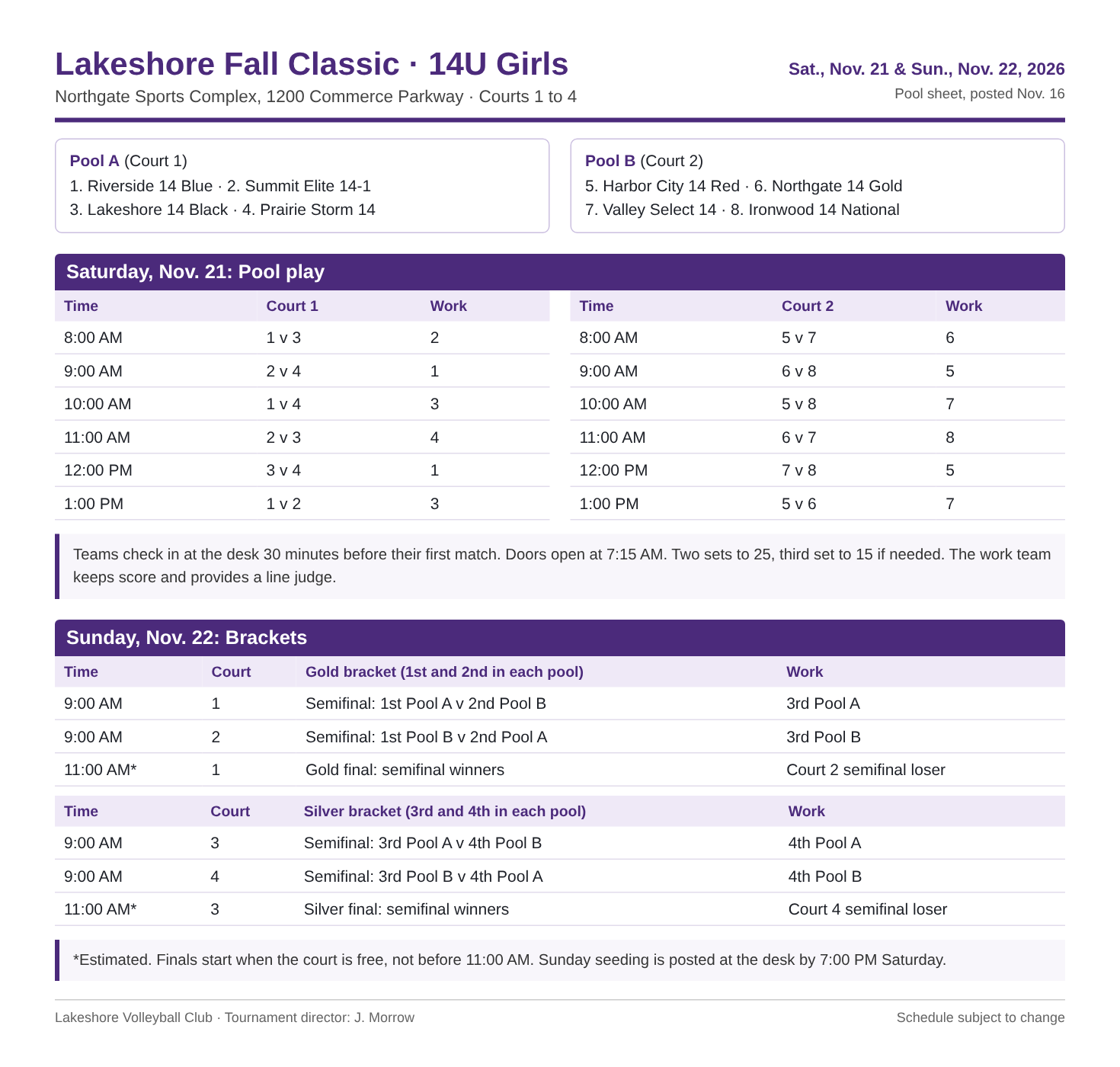
Your team is a number. Lakeshore 14 Black is team 3, so its Saturday is 1 v 3 at 8:00, 2 v 3 at 11:00 and 3 v 4 at noon. It also works the 10:00 and 1:00 matches, keeping score and calling lines.
Sunday depends on Saturday. Team 3 plays Gold or Silver depending on where it finishes, and both finals are estimates. Check-in is 30 minutes before the first match, so an 8:00 match means 7:30 at the desk.
A tournament weekend, on the calendar
The season schedule says "Fall Classic, Saturday". The pool sheet, posted days later, says when your kid actually plays. That second sheet is the one that runs the weekend.
Keep your team's matches and work slots
The free tool reads every match on the sheet. Find your team's number in the key, then uncheck the matches it is not in. Keep the work slots too. Your kid is on the court for those, keeping score or calling lines.
Sunday is a placeholder until Saturday night
A bracket match like "1st Pool A v 2nd Pool B" names no team until pool play ends. Keep both brackets' first-round times on the calendar as placeholders, and delete the one you don't play. Or run the seeding sheet when the director posts it.
One link for the whole team
Twelve families don't need to type the same Saturday. Make the list once, keep your team's matches, and send the shareable link to the team chat. Everyone who opens it can download the same schedule.
About the bracket and pool play tool
A pool sheet is a grid of numbers. The team names are in a key, the times are in a column, the courts are in another, and the work team for each match is in a third. A bracket on the same page names seeds, not teams.
This tool reads the whole sheet and writes each match down as an event, with its time and its court. A two-day tournament comes back as one list you can sort through in a minute.
What it reads
- Pool play sheets with team keys, courts and work teams.
- Single and double elimination brackets, and Gold and Silver brackets.
- Volleyball, basketball, soccer, baseball and softball tournament schedules.
- PDFs, screenshots of the tournament website, and photos of the posted sheet, up to 10 pages.
Just your kid's team: Smart Extract
The free tool reads every match on the sheet, so uncheck the ones that are not your team's before you download.
Smart Extract in the KidsFoldr app does it for you. Add your kid's team to their Family Profile, and only that team's matches and work slots are kept, even when the sheet names teams by number through a key.
Every venue's address: Add Addresses
A pool sheet often names the venue and nothing more. Add Addresses in the KidsFoldr app fills in the street address, anchored by your zip code, so Saturday morning starts with directions, not a search.
The pool sheet, one tap from every match
Every match the KidsFoldr app adds links back to its sheet, right in the calendar entry's notes. The whole pool is one tap from any match, filed under the right kid.
So the printout can go. Scan it for peace of mind, then toss it with no guilt.
What happens to your file
Your file goes to our server, which asks Claude, an AI model made by Anthropic, to read it. The matches come back to your browser. We do not save the file or the matches.
The only thing we keep is a count of how many papers came from your connection, stored as a scrambled code. That keeps the tool free. The count is deleted after two days.
Questions about this tool
Do I need an account?
No. Choose a photo or PDF of the pool sheet or bracket and download the matches. There is no signup, no email and no popup.
Can it pull out just my kid's team?
In the free tool, find your team's number in the pool key and uncheck the matches it is not in before you download. In the KidsFoldr app, Smart Extract does it for you: add your kid's team to their Family Profile, and only that team's matches and work slots are kept.
What about Sunday's bracket?
A bracket match like "1st Pool A v 2nd Pool B" names no team until pool play ends. Keep those times on the calendar as placeholders, or run the seeding sheet when the director posts it.
Does it include work assignments?
The tool reads the whole sheet, work column and all. Before you download, check that your team's work slots are in the list. A work slot means your kid is on the court, keeping score or calling lines.
How do I get the matches onto my phone?
The download is an .ics file, the standard calendar format. On an iPhone, open it from Files or Mail and tap Add All. On Android or a computer, import it into Google Calendar or Outlook.
Can I send the schedule to the whole team?
Yes. After you choose which matches to keep, copy the shareable link and send it to the team. Anyone who opens it sees the same list and can download it. The matches travel inside the link itself, so nothing is stored on our side.
Is there a limit?
Three papers an hour and ten a day from one connection. A big tournament with many pools on one sheet may hold more matches than it reads at once, so run your pool's page. That keeps the tool free for everyone.
What does the KidsFoldr app add?
Snap any paper and the app files it under the right kid, grade and type, searchable by any word on it. Its events go straight to the calendar you already use, with a color for each person, and Smart Extract keeps only your kid's team's matches and work slots.