Turn a syllabus or assignment sheet into calendar events
Snap the assignment sheet from the binder, or drop in the syllabus PDF. Every due date, quiz and test comes back as an event for any calendar.
- Each quiz, test and project deadline on its own day.
- Send the result with one link, so the student and the parent see the same dates.
- No signup, no email, no popup. It works on the first visit.
Limited by connection, not by login. Your file is read, then discarded. We keep nothing.
Due dates found
This paper had more dates than the free tool reads at once. The ones below are complete. Run the rest a unit at a time, or use the KidsFoldr app.
Uncheck anything you don't want. The file works in Apple Calendar, Google Calendar and Outlook, and it says KidsFoldr inside, so it still shows where it came from after it has been forwarded.
Try it on a real assignment sheet
Here is the kind of sheet this tool is for: one unit of a high school class, handed out on the first day of the unit and kept in the binder after that.
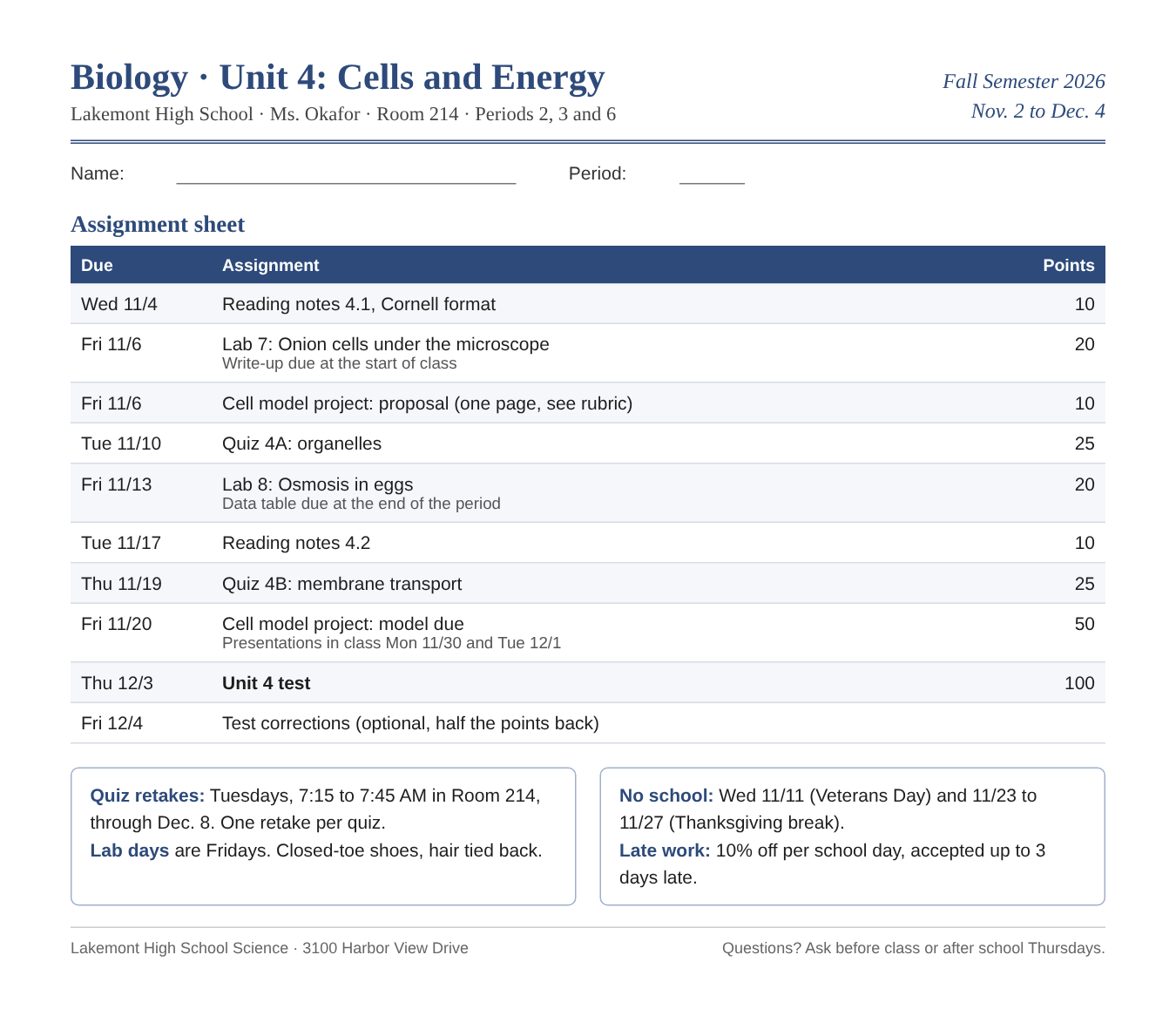
The cell model project has three dates in three places. The proposal is due Nov. 6, the model Nov. 20, and the presentations sit in small print under it: Nov. 30 and Dec. 1.
Quiz retakes are every Tuesday at 7:15 AM until Dec. 8. That is one repeating event, and it is the one a student misses because it is in a box, not the table.
A unit of due dates, on the calendar
An assignment sheet lives in a binder, and a binder is not where anyone looks on a Sunday night. Put the dates where the family already looks, and the test on Thursday stops being news on Wednesday.
Due dates, not class days
A syllabus often lists what happens in class every day. What belongs on a calendar is what is due and what is tested. The tool is built for those, so a quiz, a lab write-up and a project deadline each come back as their own event.
If a syllabus lists a topic for every class, some of those may come back too. Uncheck them before you download.
The student's calendar, the parent's, or both
Download the .ics on the student's phone, and the dates are in their calendar. Copy the shareable link and you can open the same list on yours, or send it to the other parent.
One unit at a time
A whole semester on one syllabus can hold more dates than the free tool reads at once. When that happens, the tool says so and keeps every date it read whole. Run a long syllabus a unit at a time, or run each unit sheet the day it comes home.
The year on a syllabus
Most syllabi print the term, like "Fall Semester 2026", and the tool uses that year. A sheet with no year at all is placed on the next time each date comes around.
About the syllabus to calendar tool
A syllabus is a semester of deadlines written as a table. The dates are short ("Fri 11/6"), the details hide in small print under them, and the things that repeat are written once, in a box at the bottom.
This tool reads the whole page and writes each deadline down as an event. A quiz gets its day. A project with three dates becomes three events. A retake session every Tuesday becomes one repeating event.
What it reads
- Course syllabi, unit and assignment sheets, and test and project calendars.
- High school and college syllabi, from the PDF or a photo of the printout.
- Short dates like "Tue 11/10", and repeating sessions like "Tuesdays through Dec. 8".
- PDFs, typed or scanned, up to 10 pages.
Only the dates still ahead: Smart Extract
A syllabus that comes home in October still lists September. The free tool reads every date on it, so uncheck the ones already past before you download.
Smart Extract in the KidsFoldr app does it for you. It keeps the events that apply to your family and drops the dates already past, so only what is still due reaches the calendar.
Every kid's dates, in their color
In the KidsFoldr app, each event is tagged with the kid it is for and wears that kid's color. Their events can go to their own calendars, and Event Label Format can put their name on each title, like "Lisa: Unit 4 Test".
The sheet, one tap from every due date
Every event the KidsFoldr app adds links back to its paper, right in the calendar entry's notes. The whole unit is one tap from any quiz, filed under the right kid and grade.
So the sheet in the binder can go. Scan it for peace of mind, then toss it with no guilt.
What happens to your file
Your file goes to our server, which asks Claude, an AI model made by Anthropic, to read it. The dates come back to your browser. We do not save the file or the dates.
The only thing we keep is a count of how many papers came from your connection, stored as a scrambled code. That keeps the tool free. The count is deleted after two days.
Questions about this tool
Do I need an account?
No. Choose a photo or PDF of the syllabus or assignment sheet and download the due dates. There is no signup, no email and no popup.
Will it put every class day on my calendar?
It is built for what is due and what is tested. If a syllabus lists the topic for every class, some of those may come back too. Uncheck them before you download.
What year does it use?
The year the paper prints, like "Fall Semester 2026". A sheet with no year at all is placed on the next time each date comes around.
Can my student get the same dates?
Yes. Copy the shareable link and text it to them. Anyone who opens it sees the same list and can download it to their own calendar. The dates travel inside the link itself, so nothing is stored on our side.
How do I get the dates onto my phone?
The download is an .ics file, the standard calendar format. On an iPhone, open it from Files or Mail and tap Add All. On Android or a computer, import it into Google Calendar or Outlook.
Is there a limit?
Three papers an hour and ten a day from one connection. A whole semester on one syllabus may hold more dates than it reads at once, so run a long one a unit at a time. That keeps the tool free for everyone.
What does the KidsFoldr app add?
Snap any paper and the app files it under the right kid, grade and type, with schoolwork and tests by subject too. Its events go straight to the calendar you already use, with a color for each person, and Smart Extract drops the dates already past.