Turn a camp or activity packet into calendar events
Drop in the family packet PDF, or snap the dates page. Every form deadline, session and weekly day comes back as an event for any calendar.
- Spring form deadlines land on their own days, months before camp.
- Reads "Wednesday is pool day" as a day that repeats.
- No signup. Send the dates to whoever does pickup with one link.
Limited by connection, not by login. Your file is read, then discarded. We keep nothing.
Dates found
This packet had more dates than the free tool reads at once. The ones below are complete. Run the dates page on its own, or use the KidsFoldr app.
Uncheck anything you don't want, like the sessions your kid is not in. The file works in Apple Calendar, Google Calendar and Outlook, and it says KidsFoldr inside, so it still shows where it came from after it has been forwarded.
Try it on a real camp packet
Here is the kind of page this tool is for: the dates page of a summer day camp's family packet, the one that arrives in March and matters until August.
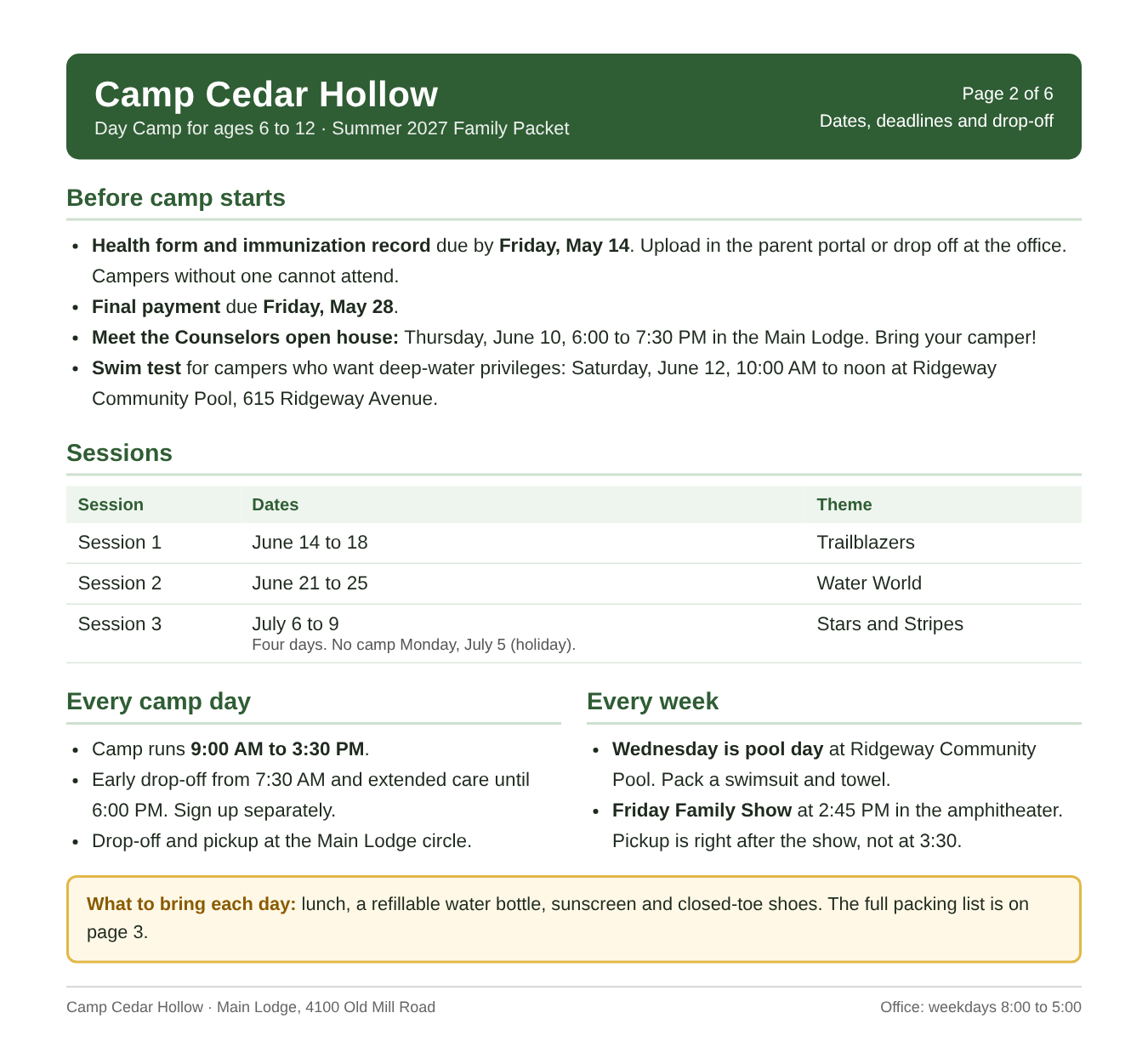
The first deadline is a month before camp: the health form, due May 14. The packet says a camper without one cannot attend.
Session 3 is four days, because July 5 is a holiday. Wednesday pool day is at a different address than camp, and on Fridays pickup is at 2:45, after the show, not 3:30.
A summer of camp, on the calendar
A camp packet is mostly rules, menus and packing lists. The dates that matter are scattered through it, and the earliest ones come due while summer still feels far away.
Put the deadlines on first
Forms and payments are due in spring. Camp starts in summer. Put the deadlines on the calendar the day the packet arrives, and the health form is not a surprise the week before camp.
Keep only your kid's sessions
A packet lists every session the camp runs. The free tool reads them all, so uncheck the weeks your kid is not in before you download. Two kids in different weeks? Run the page once and keep both.
Run the dates page if the packet is long
A family packet can run a dozen pages. The tool reads PDFs up to 10 pages, and a long, dense packet can still be more than the free tool reads. If it says so, run the dates page on its own. That is usually where every deadline lives.
The packing list is a list
What to bring has no date, so it is not an event. Run the packing list page through the supply list to shopping list tool instead, and the things to buy come back as a list you can copy or share.
About the camp packet to calendar tool
A camp packet is written for reading once, at the kitchen table. Deadlines sit inside paragraphs, sessions sit in a table, and the things that happen every week are written once, as a rule.
This tool reads the whole page and writes each date down as an event. A form deadline becomes an all-day reminder. An open house gets its start and end time. A day that repeats every week becomes one repeating event.
What it reads
- Day camp and sleepaway camp packets, confirmations and welcome letters.
- Activity and class registration packets, sports camp and VBS schedules.
- Weekly days written in words, like "Wednesday is pool day".
- PDFs, typed or scanned, up to 10 pages, and photos of a printed page.
Every place's address: Add Addresses
A packet often names a place and nothing more, like "the community pool" or a field trip's park. The free tool keeps the name the paper prints.
Add Addresses in the KidsFoldr app fills in the street address, anchored by your zip code, so pool day and the field trip are ready for directions.
Only what is still ahead: Smart Extract
Smart Extract in the KidsFoldr app keeps the events that apply to your family and drops the dates already past. Snap the packet in June, and May's deadlines stay off the calendar.
The packet, one tap from every camp day
Every event the KidsFoldr app adds links back to its paper, right in the calendar entry's notes. The packet is filed under the right kid and searchable by any word on it, so the rule about extended care is a search away.
So the packet on the counter can go. Scan it for peace of mind, then toss it with no guilt.
What happens to your file
Your file goes to our server, which asks Claude, an AI model made by Anthropic, to read it. The dates come back to your browser. We do not save the file or the dates.
The only thing we keep is a count of how many papers came from your connection, stored as a scrambled code. That keeps the tool free. The count is deleted after two days.
Questions about this tool
Do I need an account?
No. Choose a photo or PDF of the camp packet and download the dates. There is no signup, no email and no popup.
My kid is in one session. Will it add them all?
The free tool reads every session on the page. Uncheck the ones your kid is not in before you download.
The packet is twelve pages. Will it read it?
It reads PDFs up to 10 pages, and a very long, dense packet can be more than the free tool reads. If it says the paper is too long, run the dates page on its own. That is usually where every deadline is.
What about the packing list?
A packing list is a list, not a date. Run that page through the supply list to shopping list tool, and the things to buy come back as a list you can copy or share.
How do I get the dates onto my phone?
The download is an .ics file, the standard calendar format. On an iPhone, open it from Files or Mail and tap Add All. On Android or a computer, import it into Google Calendar or Outlook.
Can I send the dates to whoever does pickup?
Yes. After you choose which dates to keep, copy the shareable link. Anyone who opens it sees the same list and can download it. The dates travel inside the link itself, so nothing is stored on our side.
Is there a limit?
Three papers an hour and ten a day from one connection. That keeps the tool free for everyone.
What does the KidsFoldr app add?
Snap any paper and the app files it under the right kid, grade and type, searchable by any word on it. Its events go straight to the calendar you already use, with a color for each person, and Add Addresses fills in the street address for a place the packet only names.