How it scored
Mail-in is the strongest route in the category: one Box holds 300 to 400 pieces, and Artkive's studio photographs and edits every one (Artkive). The app route means photographing each piece yourself, on iPhone or iPad only (App Store).
Artkive keeps each kid's pieces in order by age and date (App Store). In the app, you label each piece with the child, grade and date yourself, and in the Box the labels come from your order form only if you sort the stack first (Artkive's help center).
The printed book is what Artkive is built to share, with extra copies at 60% off, and the App Store listing says you can send collections to grandparents (Artkive). Its share circle emails one image at a time, and the whole collection means sharing your login (Artkive's help center).
Box images are free to reach for 3 months; after that it's a membership, a paid bulk download or a $25 USB (Artkive). Free pieces can be removed with 30 days' notice, and deleting your account deletes the images for good (Artkive's terms).
The books and mosaics are fair value for what they are, and you approve a proof before anything prints (Artkive). The Box itself is two payments: $39 up front, then an invoice per photograph with a $75 minimum (Artkive's terms).
At a glance
- What it is
- An iPhone and iPad app, plus a mail-in service (the Artkive Box) that photographs your kids' art and prints books and framed mosaics. Made by The Kive Company
- Phones
- iPhone and iPad (also Apple silicon Macs). No Artkive app in Google Play. Android: upload on Artkive's mobile site
- Free
- Up to 39 pieces of art; Artkive can remove them with 30 days' notice
- Memberships
- $33 to $143 a year; Box VIP $39 a year
- The Box
- $39 for the box and shipping. Digitizing, books and mosaics come on a second bill
- Digitizing
- $45 for the first 25 pieces, $1.35 each after, $75 minimum
- Books and mosaics
- Books from $75 for 25 pieces, up to 350; framed mosaics $99 to $249
- Your images
- Box orders: free to reach for 3 months, then a membership, a paid bulk download or a $25 USB
Pros and cons
- With the Box you photograph nothing. It holds 300 to 400 pieces, and Artkive's studio photographs and edits each one.
- Hardcover books of 25 to 350 pieces in two sizes, with a custom cover and captions, and a digital proof to review before anything prints.
- Framed mosaics in a solid wood frame, and extra copies of a book at 60% off for the grandparents.
- A long track record: in the App Store since 2012, and rated 4.7 from 1,583 ratings there.
- The Box is two payments: $39 up front, then an invoice per photograph after Artkive counts the stack, with a $75 minimum even for a small one.
- Box images are free to reach for 3 months. Keeping them takes a membership, a paid bulk download or a $25 USB.
- The app is App Store only, and free for up to 39 pieces.
- A Box not sent back within 6 months triggers a $75 deposit, credited to your order. At 18 months the order expires and the deposit is forfeited.
How we tested
We ran hands-on tests and checked Artkive's documented features.
What Artkive costs
The app is free only for a small collection. Artkive's terms cover up to 39 pieces at no charge and let Artkive remove them with 30 days' notice, so one school year's stack puts you in a membership. Past that, the app asks you to choose one (Artkive's help center).
The Box is never one price either. $39 buys the box and shipping, and the real bill comes after Artkive photographs what you sent (Artkive).
| Item | Price | What you get |
|---|---|---|
| App, free | $0 | Up to 39 pieces; Artkive can revoke or delete them with 30 days' notice |
| Organizer | $33 a year | Unlimited storage, 10% off DIY books, $10 Artkive credit |
| Creator | $55 a year | Unlimited storage, 20% off DIY books, a free 25-page DIY hardcover |
| Book Lover | $143 a year | Unlimited storage, 30% off DIY books, a free 95-page DIY hardcover |
| Box VIP | $39 a year | Unlimited storage, 2 free Boxes a year, free rush on every order |
| Artkive Box | $39 | The box (holds 300 to 400 pieces), an art bag, the order form and a prepaid return label. Not digitizing, books or mosaics |
| Digitizing | $45 for the first 25 pieces, $1.35 each after, $75 minimum | Each piece photographed and edited; 3 months to reach the images |
| Box book | From $75 for 25 pieces, up to 350; 50 pieces $160, 100 pieces $265 | Photography, editing, a proof, printing and shipping of one book |
| Framed mosaic | $249 large (26 inches), $189 with a book; $149 small (14 inches), $99 with a book | 25 or 9 images, solid wood frame and mat, a proof first |
| Extra book copies | 60% off | Another copy of the same book |
| USB | $25 | All your high-resolution images |
| Art return | $20 | Your originals shipped back |
| Box not back in 6 months | $75 deposit | Credited to your order when the Box comes in |
What a year's stack costs
A Box and one 25-piece book come to $114, the same as Artkive's gift card. Digitizing without a book never costs less than $75. Tax not included:
- Box and a 25-piece book: $39 + $75 = $114.
- Box, 25 pieces, digitize only: $45 is under the $75 minimum, so it's $39 + $75 = $114. At that size, take the book.
- Box, 50 pieces, digitize only: $39 + $45 + (25 x $1.35) = $117.75. Add the $25 USB to have the files mailed: $142.75.
- Box, 200 pieces, digitize only: $39 + $45 + (175 x $1.35) = $320.25. That's Artkive's own worked example in its terms, plus the Box.
- Box and a 50-piece book: $39 + $160 = $199.
- Box and a 100-piece book: $39 + $265 = $304.
- The app, art you photograph yourself: Organizer at $33 a year, or Creator at $55 a year with a 25-page DIY hardcover included.
What gets counted on the invoice
Artkive bills per photograph, and everything you send is photographed and billed. Pulling a piece out of the proof doesn't lower the price (Artkive).
A two-sided piece, like the construction-paper Mother's Day card with a message inside, needs at least two photographs. The poster-board project or the clay pinch pot may need more than one (Artkive's terms). Its help center counts a card as two pieces and says 3D work is shot at an angle.
Small pieces taped or glued onto one standard page count as one. Each image you leave out of a book still costs $1 (Artkive's terms).
So pull what you don't want in the book before you pack. The stack you mail is the stack you pay for.
Two deadlines on the Box
Send the Box back within 6 months, or Artkive charges a $75 deposit, credited to your order. At 18 months the order expires, the deposit is forfeited, and a new label to restart it costs $15 (Artkive's terms).
Once the invoice comes, pay it within 30 days. After that, Artkive may charge your card for digitizing everything you sent, or $75 if that's more (Artkive's terms).
What it does with the paper
The June art folder is emptied on the table: forty-odd paintings, Tuesday's crayon self-portrait, a painted paper plate, the construction-paper Mother's Day card, the poster-board project, a clay pinch pot. Artkive gives that stack two routes. Mail it in the Box and Artkive's studio photographs it, or photograph it yourself in the iPhone app; either way the images live in your Artkive account (Artkive).
The Box: mail the stack, approve a proof
You fill the Box, mark the book or mosaic you want on the order form, and send it back on the prepaid label. Artkive photographs and edits every piece, invoices you for the count, then designs the book and sends a proof for you to approve before it prints (Artkive).
Sort the stack by kid and grade before it goes in. Artkive labels each piece by child and age from your order form, won't sort a mixed stack for you, and photographs it top to bottom as it came out of the box (Artkive's help center).
Expect the proof about 8 to 10 weeks after the art arrives, with the longest waits from August to November (Artkive's help center).
The originals don't come back unless you pay $20 for art return. Otherwise Artkive emails you 15 days' notice before they're destroyed (recycled, its help center says), and you can still order return in that window (Artkive's terms). Decide before you seal the Box whether you want the paper back at all.
As for how to store kids' artwork after that: store the scan, not the stack.
The app: you photograph each piece
In the iPhone or iPad app, you snap each piece yourself (App Store), or pick it from the camera roll, or upload it from a computer on Artkive's website. You label each piece with the child, grade and date (Artkive's help center). Artkive keeps each kid's pieces in order by age and date (App Store).
There's no Artkive app in Google Play. Its help center says Android families log in and upload on Artkive's mobile site.
For a printed book later, you make a DIY book from your own photos. The Creator membership's free 25-page hardcover covers the first one (Artkive).
Afterward: getting your pictures back out
The images live in your Artkive account, on its website and in the iOS app. Getting every one onto something you own takes a download, a paid bulk download, or the $25 USB (Artkive).
For Box orders, access ends 3 months after you get it, or 3 months after the book prints. To keep it, buy the USB, a bulk download or a membership; Artkive doesn't publish the bulk download's price (Artkive's terms).
If you want the files, add the $25 USB to your order, and the 3 months stop mattering. It comes with the images in folders by child and age (Artkive's help center).
Downloads are from My Gallery on Artkive's website, and if your access has lapsed, Artkive suggests a month-to-month plan for as long as you need it. The Box images are 2500 pixels on the long edge, edited for the book; Artkive says they print well, with slight softness up close above 16x20 inches (Artkive's help center).
Free pieces in the app can be removed with 30 days' notice. Deleting your account deletes the images for good unless you downloaded them first (Artkive's terms and privacy policy).
The printed book is the share Artkive is built for, with extra copies at 60% off (Artkive). The App Store listing says you can send collections to grandparents. Its share circle emails a grandparent each image you share, not the whole collection; for everything, Artkive suggests sharing your login (Artkive's help center).
Before you upload, read both license sections of Artkive's terms: one grants Artkive a broad, permanent license to anything you submit, including the right to sell it, and a later one says it does not sell or commercialize children's content or use it for ads (Artkive's terms).
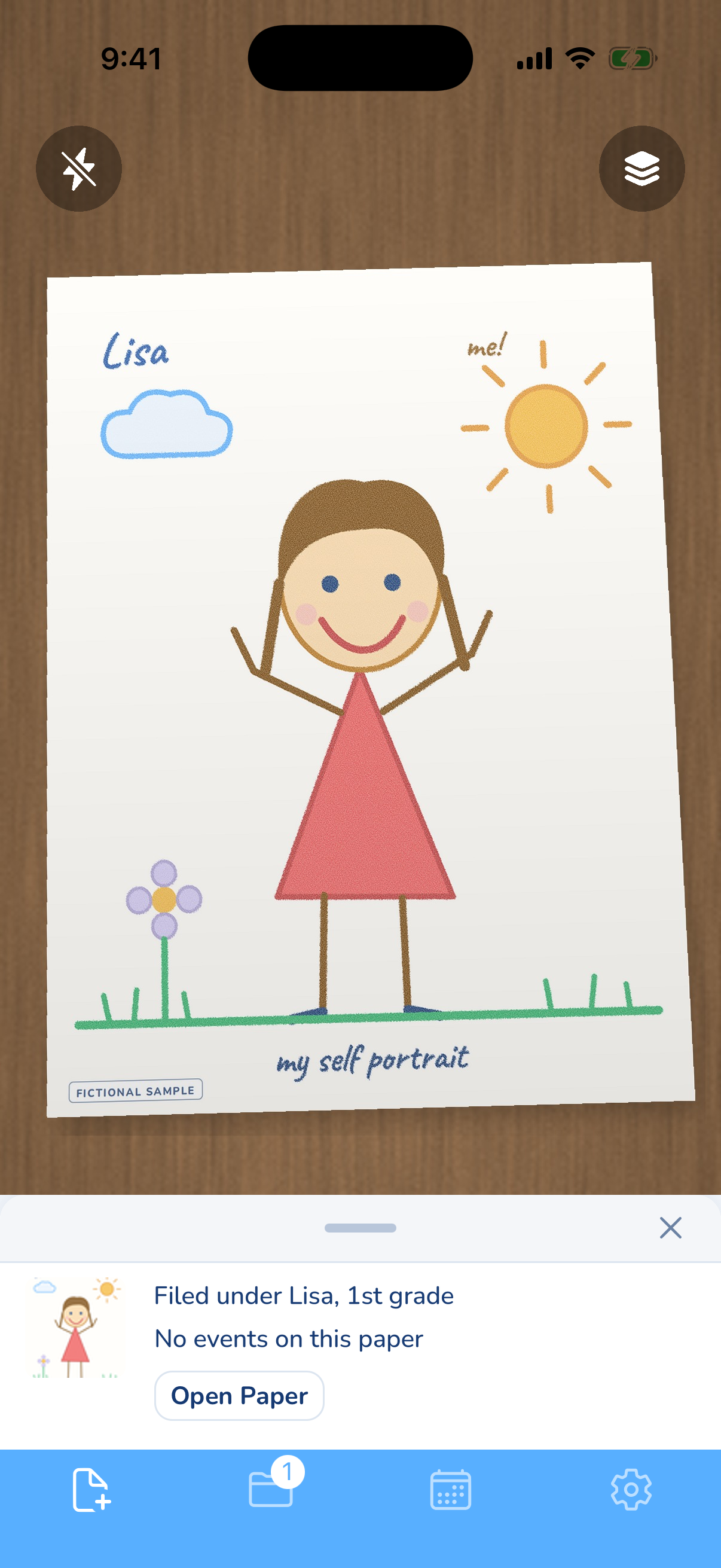
With KidsFoldr, the drawing is saved the day it comes out of the backpack: snap it, and it's kept for good under that kid and grade, safe and shareable. A name your kid wrote at the top is read to file it, and a sideways photo is turned upright, so nobody types a label. Scanned for peace of mind, the drawing can go to the recycling that day, so there's no June stack to sort and no art folder in the closet.
You keep your own copy, too. Turn on automatic backup, and every paper goes to KidsFoldr Cloud as it is filed. One tap on Back up copies every paper to your own Google Drive or iCloud, in a folder for each kid with grade folders inside. Share a kid's folder, and a grandparent who accepts in KidsFoldr sees each new drawing as it's filed.
Screenshots
If not this, then
Weighing Keepy vs Artkive? We couldn't find Keepy's kids' art app in the App Store or Google Play; here's what happened to Keepy.
FAQ
Is Artkive worth it?
Yes, if you want a printed book of the year's art and would rather mail the stack than photograph it: the Box and a 25-piece book come to $114. For just keeping every drawing, it costs more than it should, and getting your own copy takes extra steps.
How much does Artkive cost?
The Box is $39, then an invoice per photograph with a $75 minimum, plus any book or mosaic. App memberships run $33 to $143 a year.
Is Artkive free?
The app is free for up to 39 pieces, and Artkive's terms let it remove them with 30 days' notice. Beyond that, you need a membership, from $33 a year.
Is Artkive on Android?
No. The app is in the App Store only, and there's no Artkive app in Google Play. Its help center says Android families log in and upload on its mobile site.
Can I download all my Artkive pictures?
Yes: download them from Artkive's website, buy a bulk download, or order the $25 USB. Box images are free to reach for 3 months, and deleting your account deletes them for good unless you downloaded them first.
Is there a cheaper alternative to Artkive?
For a book, Keepbox includes one hardcover art book a year with a $29.99 yearly membership, on iPhone and Android (Keepbox). For just keeping the art, Google Photos or Apple Photos is likely already on your phone.
Read next in this cluster
Sources
- Artkive, home (checked Nov 2, 2026)
- Artkive, pricing (checked Nov 2, 2026)
- Artkive, membership plans (checked Nov 2, 2026)
- Artkive, digitization (checked Nov 2, 2026)
- Artkive, art book for kids (checked Nov 2, 2026)
- Artkive, Terms of Use (checked Nov 2, 2026)
- Artkive, Privacy Policy (checked Nov 2, 2026)
- Artkive - Save Kids' Art on the App Store (checked Nov 2, 2026)
- Google Play search for "artkive" (checked Nov 2, 2026)
- Artkive help center, how the app works (checked Nov 2, 2026)
- Artkive help center, app features and platforms (checked Nov 2, 2026)
- Artkive help center, uploading images (checked Nov 2, 2026)
- Artkive help center, Android (checked Nov 2, 2026)
- Artkive help center, when a membership is required (checked Nov 2, 2026)
- Artkive help center, organizing your art (checked Nov 2, 2026)
- Artkive help center, is organizing required (checked Nov 2, 2026)
- Artkive help center, how long it takes (checked Nov 2, 2026)
- Artkive help center, photography (checked Nov 2, 2026)
- Artkive help center, double-sided art (checked Nov 2, 2026)
- Artkive help center, the Box service (checked Nov 2, 2026)
- Artkive help center, art return (checked Nov 2, 2026)
- Artkive help center, Box pricing (checked Nov 2, 2026)
- Artkive help center, image specs (checked Nov 2, 2026)
- Artkive help center, USB (checked Nov 2, 2026)
- Artkive help center, getting your images off Artkive (checked Nov 2, 2026)
- Artkive help center, share circle (checked Nov 2, 2026)
- Google Photos Help, storage (checked Nov 2, 2026)
- Google Account Help, Google Takeout (checked Nov 2, 2026)
- Apple, iCloud (checked Nov 2, 2026)
- Apple Support, download photos from iCloud (checked Nov 2, 2026)
- Keepbox (checked Nov 2, 2026)