KidsFoldr
Roundup, 2026

Best apps for saving kids' artwork in 2026

Ten years from now, can you find that crayon drawing and send it to Grandma? We ranked seven apps on that one question, and list the ones we left out and why.

KidsFoldr is one of the apps ranked here, and we make it. We take no affiliate commission from any product on this list. The table decides the order.

Our picks at a glance

It's June, and the art folder is emptied onto the kitchen table: forty paintings, a Mother's Day card, a poster-board project shedding glitter. The way to digitize kids' artwork that holds up is to photograph each piece into an app that keeps it by kid and grade, so you can find it years later and the paper can go.

If you're still sorting out what's worth keeping from the rest of the school pile, start there.

The one axis

Ten years from now, can you find that drawing and share it?

Think of the crayon self-portrait from kindergarten, the one Grandma asks about when your kid is in fifth grade. This test asks who did the labeling, you or the app, and whether every image comes out of the app in a form you can open without it. A printed book is lovely, but it holds the pieces you picked that year, not the whole archive.

The full comparison

Scroll sideways on a phone. The app name stays put.

App Ten years from now, can you find it and share it? Sorted by kid and grade Sharing with family A copy outside the app Books and prints Price
KidsFoldr Yes: filed by kid and grade on its own Yes, with no taps Share a kid's folder; Grandma sees new art as it's filed, free for her One tap on Back up copies every paper to your own Google Drive or iCloud, a folder for each kid Portfolio PDF to share or print; print any drawing $3 a month. 14-day free trial, no card.
Artkive With work: you label each piece with child, grade and date You type them (app); taken from your order form (Box) Share circle: an email for each image you share Download from Artkive's website; a bulk download is a paid request; USB of every image $25 Hardcover books from $75; framed mosaics App free up to 40 images, then $33 to $143 a year. Box $39, digitizing from $45 for 25 pieces (Artkive)
Keepbox With work: you save each piece to a child's gallery A gallery per child; grade not documented Private family feed Syncs to your Google Drive, Dropbox or iCloud (Keepbox's site) Hardcover book up to 250 pages, one included yearly; extra books $39.99 $29.99 a year after a 3-day trial (Keepbox's site; the App Store lists other prices)
Google Photos With work: you build an album for each kid No; albums are yours to make Share albums with anyone, even without the app Google Takeout downloads everything Photo books, prints, canvas Free with 15 GB, shared with Gmail and Google Drive (Google)
ArtKeep With work: you tag the child and date A profile per child; albums you name, such as by grade A private web link; family views it in a browser, no app On the phone by default; iCloud sync with Pro; image export Printable PDF art books Free version; Pro $3.99 a month, $24.99 a year or $79.99 lifetime (App Store)
Apple Photos and iCloud With work: one library by date unless you make albums No Shared Albums; from iOS 27, family can join on the web without an Apple Account Yes: download originals from iCloud.com or export from Photos (Apple) Through third-party apps in Photos on a Mac; print at home with AirPrint (Apple) iCloud 5 GB free; iCloud+ 50 GB $0.99 a month (Apple)
ArtShow With work: you file each piece by artist and collection Artists you create; no grade field documented To social and messaging apps Download; bulk export not documented Prints, canvas, mugs and shirts in its shop 1-month trial (10 pictures), then Lite $1.99 a month or $19.99 a year; Premium $3.69 a month, $36.90 a year (App Store) or $38.00 a year (ArtShow's site)

How we picked

We ran hands-on tests and checked each app's documented features. For other apps, that means each vendor's own site, help center and App Store and Google Play listings; for KidsFoldr, our own product documentation.

Every ranked app is live in the US stores. All are in both, except Artkive and ArtKeep, which are in the App Store only, and Apple Photos, which is built into the iPhone.

Each app got the same five checks: does it sort by kid without you, does it know the grade or age, can family see the art without the app, does it leave a copy you can open without the app, and does it make books or prints? Then we noted the price, as the vendor states it.

"Not documented" means the vendor's own pages don't say.

7 appsranked
14 apps and serviceschecked
5 checksscored for every app
$0affiliate income

Every app, ranked

KidsFoldr ranks first on this question because it files each drawing by kid and grade without you. Every other app here asks you to pick or tag the child.

1

KidsFoldr

Best if the art should file itself
$3 a month. 14-day free trial, no card.
Ten years from now, can you find it and share it?

Yes. Snap the crayon self-portrait, and it's kept for good as Artwork under that kid and grade, with no labeling, so the paper can go to recycling.

Snap the June pile in a row with the Camera, or pick the drawings already in your camera roll with Photos, and each one files itself. A sideways photo is turned upright, and a name your kid wrote at the top is read to file it under them. Tap the title to call it "Lisa's dinosaur," and you'll find it later by kid, grade or that title.

Good

Share a kid's folder with Grandma, and she sees each new drawing as it's filed, free for her. Turn on automatic backup, and every paper goes to KidsFoldr Cloud as it is filed. One tap on Back up copies every paper to your own Google Drive or iCloud, in a folder for each kid. A Portfolio PDF gathers a kid's art for a grade or several, its Artwork section filled on its own, to share or print.

Bad

For a hardcover book of the year's art, Artkive and Keepbox are built for it.

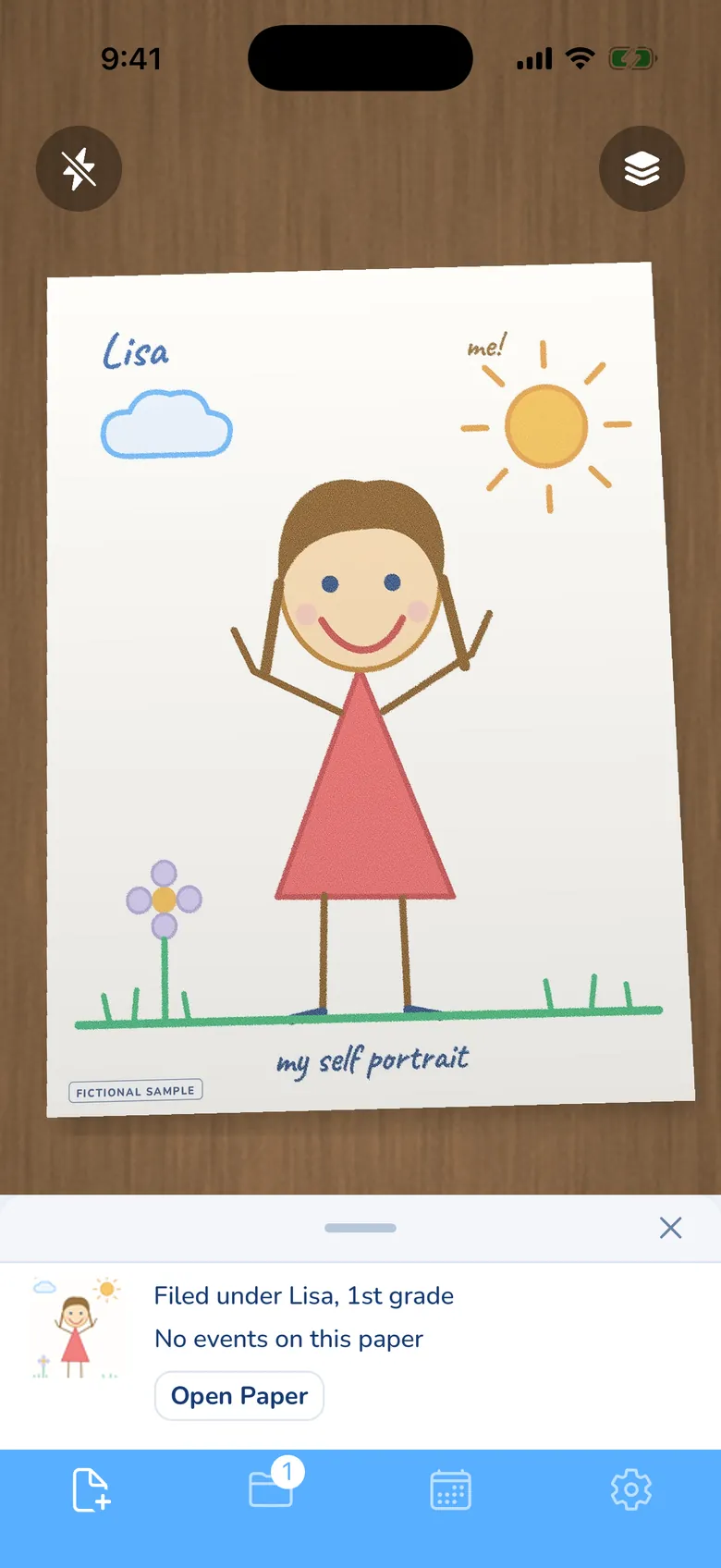
The KidsFoldr camera with a child's crayon self-portrait on a desk in the viewfinder: a smiling girl in a red dress, a sun, a cloud and a flower, with the name Lisa written at the top and a FICTIONAL SAMPLE mark. The receipt below it reads "Filed under Lisa, 1st grade" and "No events on this paper", with an Open Paper button.
The drawing is filed under the kid and grade, with nothing typed. Lisa and the drawing are fictional.
2

Artkive

Best for a printed book
App free up to 40 images, then $33 to $143 a year. Box $39, digitizing from $45 for 25 pieces (Artkive)
Ten years from now, can you find it and share it?

With work. You label each piece with your child's name, grade and date, and Artkive keeps it in its cloud.

Artkive is two products. The app is where you photograph and label each piece; Artkive's help center says it's for iPhone and iPad, and Android users upload on its mobile site. The Artkive Box is a shipping box you fill (it holds 300 to 400 pieces) and mail back; Artkive's studio photographs each piece, labels it from your order form, and sends a book proof about 8 to 10 weeks after the art arrives.

Good

The strongest book option here: hardcover books from $75 for 25 pieces, framed mosaics, and a proof before anything prints. With the Box, you photograph nothing yourself.

Bad

Getting everything out takes a request. You download from Artkive's website, and a bulk download is a paid request (or $25 for a USB of every image). Artkive may remove a non-member's images 90 days after notice, and share circle members get an email for each image you share with them, not the whole collection.

3

Keepbox

Best for a yearly book in the price
$29.99 a year after a 3-day trial (Keepbox's site; the App Store lists other prices)
Ten years from now, can you find it and share it?

With work. You save each piece to a gallery for that child, and Keepbox syncs a copy to your own cloud.

Keepbox is newer and actively updated, on iPhone and Android. It auto-crops and straightens each photo, and adds extras like animated versions and voice or video notes (Keepbox's site). If you want a cheaper Artkive alternative that still ends in a hardcover book, this is the one to look at.

Good

A hardcover art book of up to 250 pages comes with the yearly membership, and extra books are $39.99 with shipping included. One tap syncs your art to Google Drive, Dropbox or iCloud.

Bad

You pick the child for every piece. Its pages don't say how grade or age is set, or whether family members need the app to see the private feed.

4

Google Photos

Best free option
Free with 15 GB, shared with Gmail and Google Drive (Google)
Ten years from now, can you find it and share it?

With work. The drawings are safe and easy to share, but you build an album for each kid and keep it up.

It's the free choice many parents already have on their phone. You can share a photo or an album with anyone, even if they don't use Google Photos, and Google Takeout downloads the whole library when you want it out. If your family already runs on Google, here's how to handle the rest of the pile in Google Drive for school papers.

Good

Free, a real export, and photo books, prints and canvas you can order in the US.

Bad

Nothing sorts art by kid or grade. Face groups label people in photos, and a drawing on its own has no face of your kid to match. Your 15 GB fills with Gmail and Google Drive too, and Google says content may be deleted after 2 years of inactivity in Google Photos.

5

ArtKeep

Free version; Pro $3.99 a month, $24.99 a year or $79.99 lifetime (App Store)
Ten years from now, can you find it and share it?

With work. You tag each piece with the child and date, and you can name albums by grade yourself.

ArtKeep is an iPhone scanner built for art: edge detection, crop and straighten, batch scanning and camera-roll import. It's in the App Store only; we found no Google Play version.

Good

A private web link lets family see the art you choose in a browser, with no app. It also makes printable PDF art books.

Bad

Art stays on the phone by default, and iCloud sync comes with Pro. ArtKeep's site recommends its cloud backup or your phone's iCloud backup, so set one up before the June pile goes in.

6

Apple Photos and iCloud

iCloud 5 GB free; iCloud+ 50 GB $0.99 a month (Apple)
Ten years from now, can you find it and share it?

With work. Every drawing lands in one library by date unless you make an album for each kid.

It's the default for iPhone families. Shared Albums let you invite family to view and add photos, and from iOS 27 they can join on the web without an Apple Account or an Apple device. When you want copies out, you can download originals from iCloud.com, up to 1,000 at a time, or export them from Photos on your iPhone (Apple).

Good

Built in, nothing to install, and an iCloud+ plan can be shared with up to five family members.

Bad

Storage depends on the iOS version. Shared albums created on iOS 27 or later are full resolution and count toward the owner's iCloud storage. Albums made on iOS 26 or earlier don't count, but share photos at 2048 pixels on the long edge.

7

ArtShow

1-month trial (10 pictures), then Lite $1.99 a month or $19.99 a year; Premium $3.69 a month, $36.90 a year (App Store) or $38.00 a year (ArtShow's site)
Ten years from now, can you find it and share it?

With work. You file each piece under an artist and a collection you create, with no grade field documented.

This is ArtShow by Artistic Ventures, not ArtShow Plus, which is an art fair sales app. It runs on iPhone, Android and the web, lifts the art off its background and offers enhanced versions. If you cancel, you keep access to what you've saved (App Store).

Good

An in-app shop for framed prints, canvas, mugs and shirts.

Bad

Bulk export isn't documented, and the app has had no update in more than a year in either store.

How to store kids' artwork: keep the scan, not the box

A box in the closet is bulky, you can't search it, and the drawing Grandma asks about is somewhere near the bottom. A scan is a permanent copy you can find and send in a minute.

If you're weighing a box against your phone for every kind of paper, here's why the box loses. If your pile is mostly report cards and permission slips, not drawings, the filing apps roundup ranks the apps for those.

How to photograph a drawing so it lasts

One good photo now is the one you'll be looking at in ten years, so give each piece a minute.

  1. Use even light with no harsh shadow across the page. Artkive's help center advises a clear image in even lighting (Artkive).
  2. Shoot in daylight from a window, with the flash off, so crayon and glossy paint don't shine back at the lens.
  3. Hold the phone flat and level over the page, with all four edges inside the frame.
  4. For the poster-board project, lay it on the floor and stand over it, or snap your kid holding it.
  5. For 3D pieces like a clay pinch pot, shoot at an angle to show depth, as Artkive's studio does.
  6. For the Mother's Day card, snap the front and the inside. Artkive counts a card as two pieces for the same reason.

What we left out, and why

These came up in store searches and other lists, but didn't make the ranking.

Keepy

We couldn't find Keepy's kids' art app in the App Store or Google Play, and its website and help center weren't working when we checked. That left nothing we could score.

Canvsly

Canvsly's site now publishes articles and says it doesn't sell storage software; we found no Canvsly app in either store.

KidsGallery

It's in both stores, but has had no update in more than a year and a half, and its pages don't describe sorting, backup or export. There was too little to score.

Artsonia

The school runs it: the art teacher uploads to the school's gallery, and you connect with a code from the teacher. It's free, family can follow along and comment with your approval, and it sells prints, mugs and canvas with the art, giving 20% to the school's art program. Art the teacher uploads may count as a school record and is kept at the school's direction, so download the pieces you want to keep from your parent account.

Plum Print and Shutterfly

Both make a book, not an archive you keep adding to. Plum Print builds one from art you mail in.

Microsoft Lens

Microsoft retired it and removed it from the App Store and Google Play, and points users to the scanner in the OneDrive app (Microsoft).

Questions parents ask

How do I throw away kids' artwork without guilt?

Scan it first, for peace of mind, then let the paper go. Once the photo is saved where you can find it, the drawing still exists, and you can send it to Grandma in a minute. If your kid minds, let them snap their own favorites.

What's the fastest way to digitize kids' artwork in bulk?

Mail the pile to Artkive and photograph nothing, then wait about 8 to 10 weeks for a book proof (Artkive). Or photograph the pile in one sitting at the kitchen table, in an app that files each piece by kid on its own, so there's no labeling afterward.

Can Grandma see the art without an app?

Yes, with a few of these. Google Photos shares albums with anyone, even if they don't use Google Photos. ArtKeep's private web link opens in a browser, and from iOS 27, Apple Shared Albums let family join on the web without an Apple Account.

Sources

All checked Oct. 23, 2026.